Know What CVEs Your Cluster Is Actually Running
· 5 min read

This is a cluster you already run, and these are the CVEs in its latest scan — the image, the package, the version you have, and the version that fixes it.
Platform tag description
View All TagsThis is a cluster you already run, and these are the CVEs in its latest scan — the image, the package, the version you have, and the version that fixes it.
Kubernetes standardized infrastructure primitives. Nobody standardized the glue above them.
Every company needs a different platform blueprint. They should be able to compose it from shared capabilities, on a standard runtime and trust layer, inside infrastructure they own.

Different infrastructure underneath. One foundation for the blueprint you choose.
Here is a small thing that still delights me. Take the kind cluster running on your laptop, run one command, and it shows up in the same console as a production cluster on EKS: same deploy pipeline, same add-ons, same cost view. Not a simulation of production. The same blueprint running on the same foundation.
I want to explain why we built it that way, because behind that small trick sits our entire argument about how infrastructure should work for startups and mid-size companies. It starts with giving Kubernetes credit for what it actually standardized, and being honest about what it never did.
Requests are not waste: teams use them to preserve schedulable capacity for bursts, startup spikes, and reliability. They also determine how workloads fit on nodes, so more headroom than a workload needs can block consolidation or occupy capacity another workload could use.
AstroPulse shows requests beside time-averaged usage for every cluster, namespace, and application. The gap starts an investigation; it does not prescribe a new request.
Compare requested headroom with average use, then decide whether the gap is intentional.
Many startups begin with one application and a hosted deployment service. That is usually the right decision. The team can ship without first building networking, deployment automation, or an operations layer.
The requirements change as the company adds services, environments, enterprise customers, private networking, and infrastructure ownership. The team still needs a short path to production, but the applications now need to run in infrastructure the company controls.
AstroPulse gives growing engineering teams a repeatable path from code to production in infrastructure they control, without requiring them to build the platform themselves.
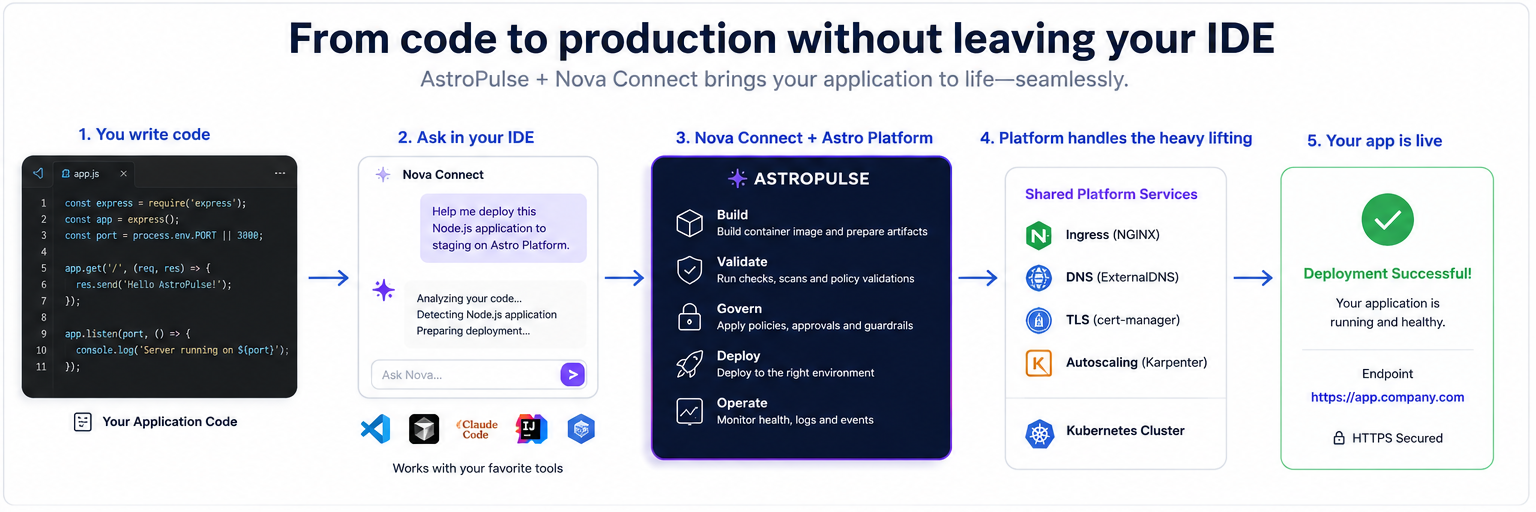
From code in the editor to a healthy application, with one platform reused across multiple services.
Our earlier build-your-own-PaaS blueprint wired up ingress, TLS, and DNS by hand. Now it's three managed add-ons and one domain verification: install NGINX + cert-manager + ExternalDNS, verify a domain once, and every container image you deploy comes up on your own domain with real, auto-renewing HTTPS. Do it from the console, the CLI, or just ask your AI. All three drive the same platform.
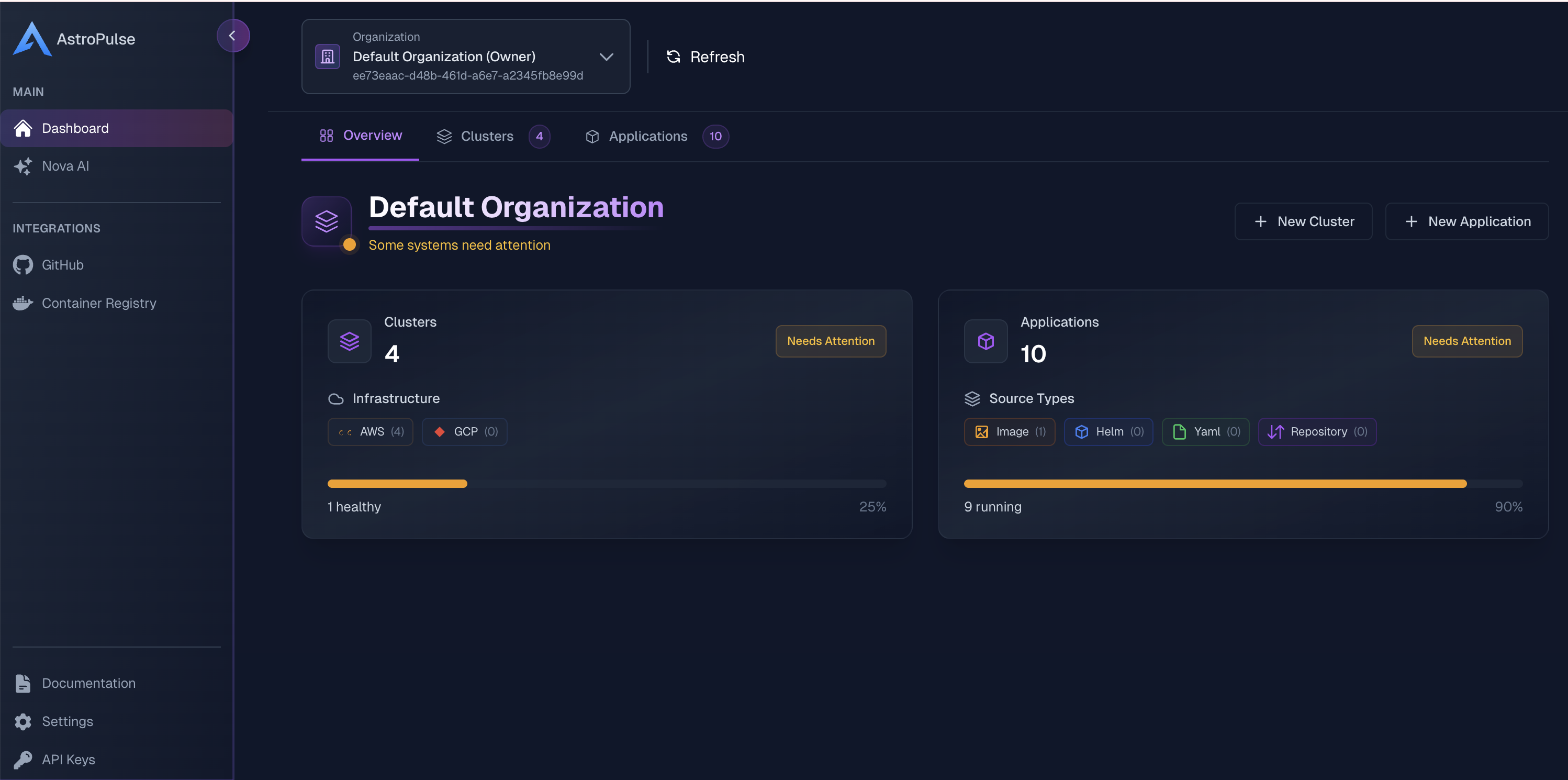
Three ways to follow along. Each step below leads with the console walkthrough, with the CLI and AI equivalents in the tabs underneath:
astroctl …, copy-paste ready.platform.astropulse.io/mcp) and describe what you want. For building an image straight from a repo, the astro-deploy MCP does that too.You need exactly one thing: a Kubernetes cluster connected to AstroPulse, running with the cloud's own identity — IRSA on AWS, Workload Identity on GCP/Azure. That identity is what lets ExternalDNS manage DNS and cert-manager solve ACME challenges without ever handling a cloud credential.
The easy path is to let AstroPulse provision the cluster. It wires that identity up for you:
$ # one-time: connect your cloud account
astroctl cloud aws connect --account-id 123456789012 --region us-east-1 --cluster-name prod

# provision the cluster — IRSA / Workload Identity is set up automatically
astroctl infra k8s apply -f cluster.yaml
Already run your own cluster? Register it instead, then set up the identity per the add-on docs:
$ astroctl infra k8s register --cluster-name my-cluster
On your cluster's Add-ons tab, choose Install Add-on and pick from the catalog. Each installs with production-sensible defaults; you tune only what matters.
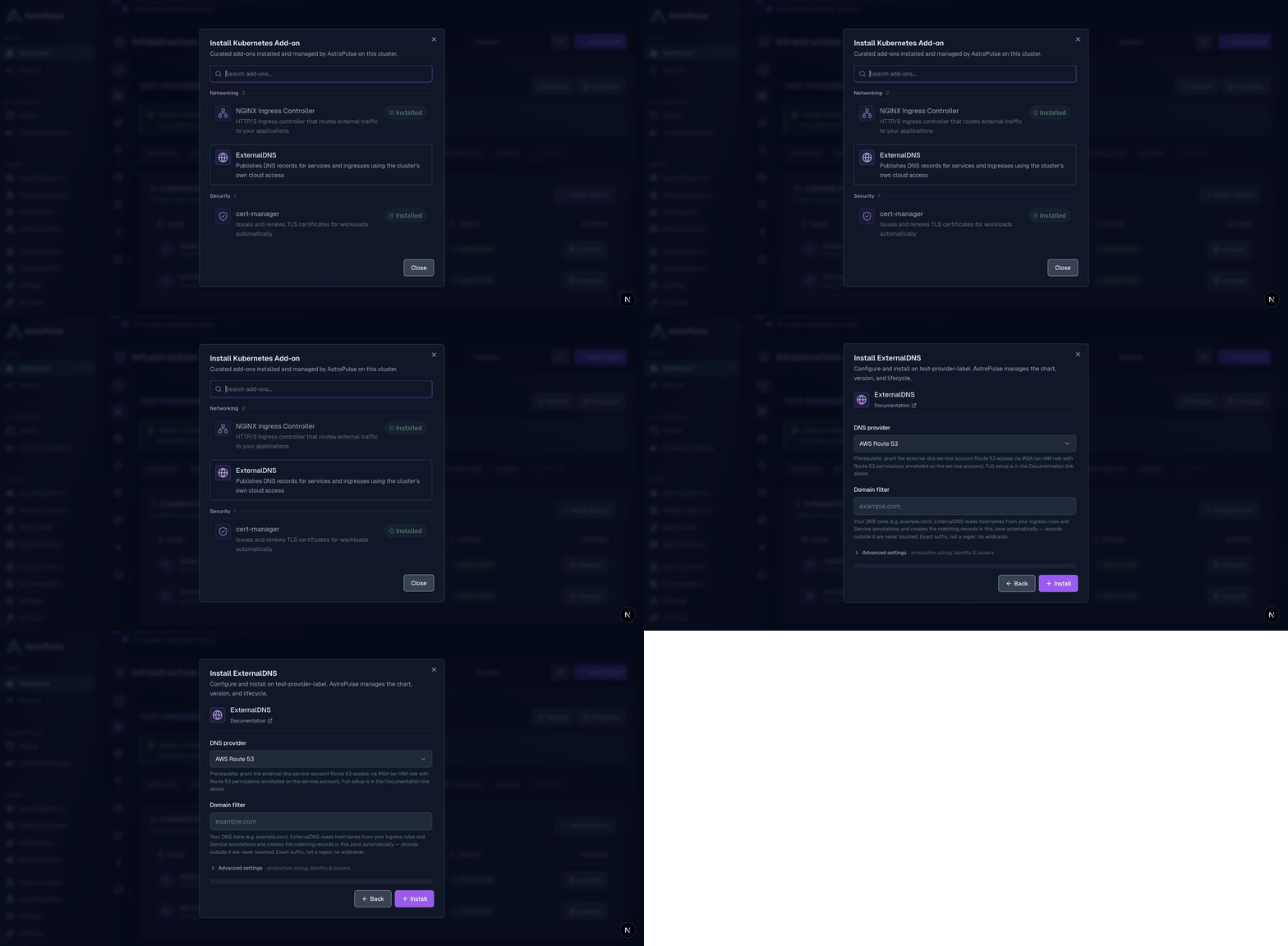
example.com). It uses the cluster identity from the prerequisite step, so no keys are ever stored.Prefer YAML? The same add-ons apply declaratively. Copy-paste the example manifests:
$ astroctl infra k8s addons apply -f nginx-ingress.yaml
astroctl infra k8s addons apply -f cert-manager.yaml
astroctl infra k8s addons apply -f external-dns.yaml
astroctl infra k8s addons get prod        # all add-ons + health
Installed together, they compose into automatic, production-grade HTTPS: cert-manager solves the ACME challenge through NGINX, ExternalDNS creates the DNS record, and NGINX terminates TLS at the edge with the issued certificate. Certificates renew themselves.
In Settings → Domains, add a domain you control and publish the TXT record it shows you. Once it verifies, every internet-facing app can serve on it, on a hostname you choose (shop.example.com) or an auto-generated one.
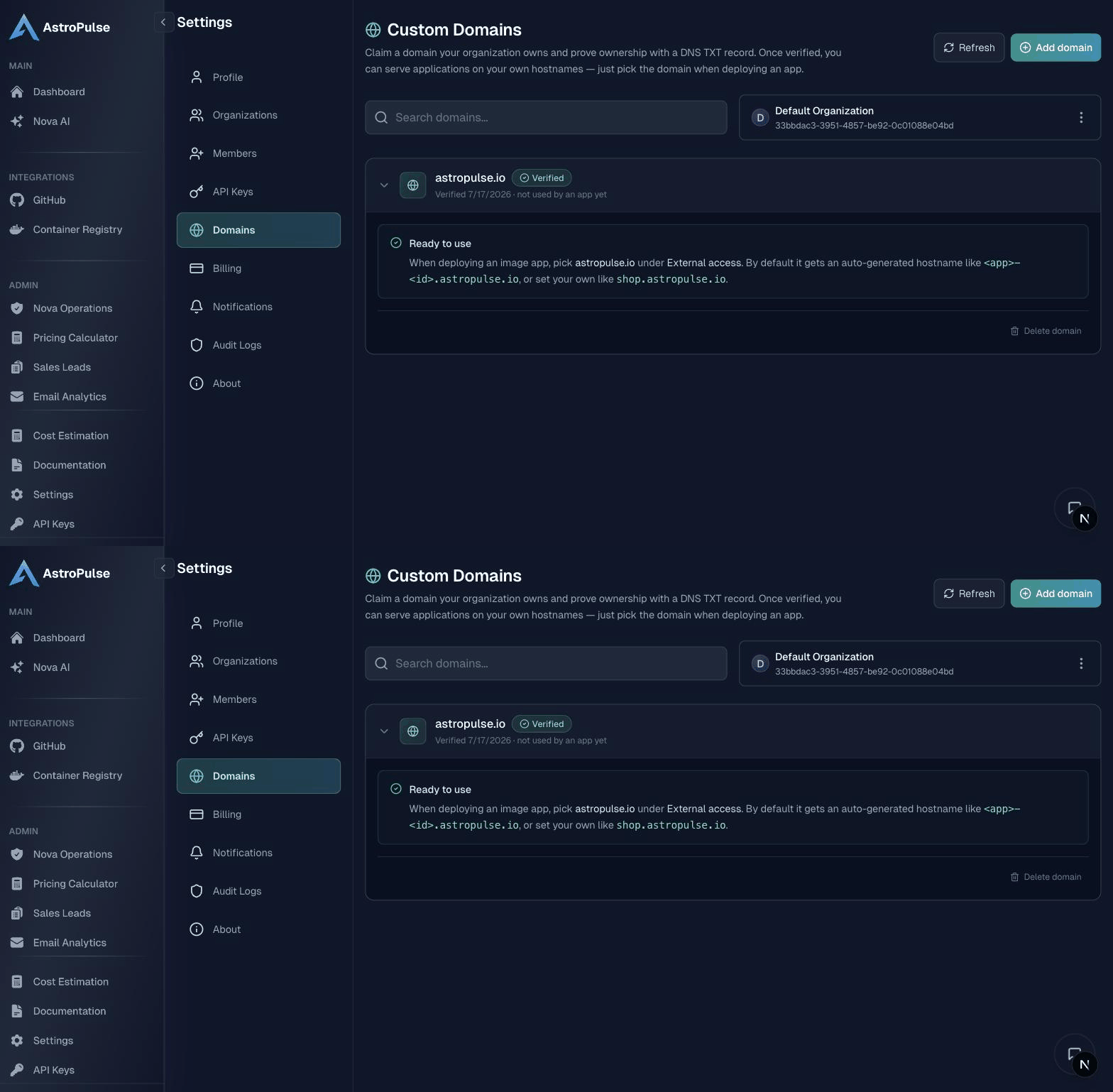
$ astroctl domain add example.com      # prints the TXT record to publish
astroctl domain verify example.com   # run once DNS has propagated
See Custom Domains for the details.
Custom domains attach to Container Image applications; that's the exposure model. Here's a ready-made image so you can watch the whole thing light up:
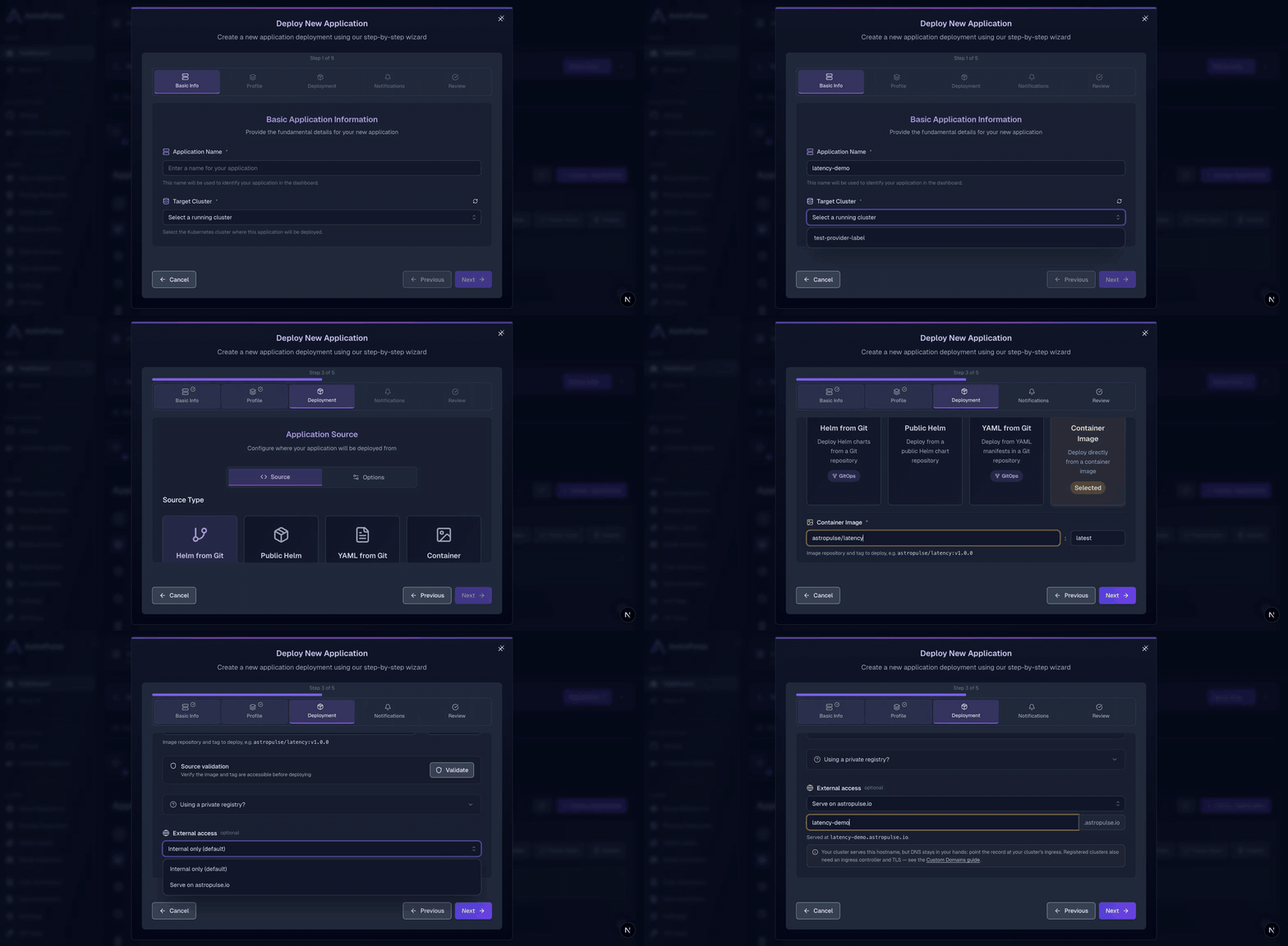
astropulse/latency:v1.0.0.<app>-<id>.example.com).Within a minute or two the app is running, its DNS record and TLS certificate are created for you, and it's live on https://<your-host>.example.com.
$ cat <<'EOF' | astroctl app apply -f -
apiVersion: platform.astropulse.io/v1
kind: Application
spec:
name: latency-demo
profileName: <YOUR_PROFILE_NAME>   # list: astroctl app profile get
source:
  type: image
  image:
    registry: docker.io
    repository: astropulse/latency
    tag: v1.0.0
externalAccess:
  domain: example.com              # verified domain → latency-demo-<id>.example.com
EOF
Want to validate the wiring before touching a cloud account? The whole flow runs on a local kind cluster, with a few local swaps:
Deploy any container image with an ingressClassName: nginx Ingress and it's reachable through NGINX exactly as it would be through a cloud LoadBalancer in production. Full steps are in the add-on docs' local testing section.
The blueprint still stands if you want to own every piece. But the ingress, TLS, and DNS plumbing is now something AstroPulse installs, keeps healthy, and upgrades for you, reachable from a console, a CLI, or a sentence to your AI. Push an image, get a live URL on your own domain with real HTTPS. That's the whole idea.
When I started AstroPulse, the problem was easy to name and hard to live with: teams moving to the cloud were drowning in tools. Every provider had its own consoles, its own primitives, its own way to deploy an app and stand up a cluster. The work that mattered, shipping software, kept getting buried under the work of operating it.
I wanted one place to deploy an application and run a cluster, on any cloud, without learning five different platforms first. That was the beginning. Everything since has been built on top of that one idea, one layer at a time.
Six months in as platform lead and you have a spreadsheet you haven't shown your manager. Eleven Kubernetes clusters. EKS for production. GKE for the ML team. Two on-prem clusters behind the firewall that predate your tenure. A handful of Kind clusters developers spun up locally. Each one has its own deployment pipeline, its own credentials rotation process, its own way of answering "is this service healthy?"
Your team isn't building features anymore. You're maintaining eleven slightly different versions of the same tooling.
astroctl infra k8s register --name my-cluster
In this guide, you'll build your own Vercel-like platform on Kubernetes in ~30 minutes:
Perfect for building internal developer platforms, launching SaaS products, or meeting enterprise compliance requirements.
You want the simplicity of "push code, get a live URL"—the developer experience Vercel pioneered—but with full control over your deployment, infrastructure, and compliance. This guide shows you how to build that experience on your own AWS infrastructure using AstroPulse and open-source tools: kpack, cert-manager, external-dns, and nginx-ingress.
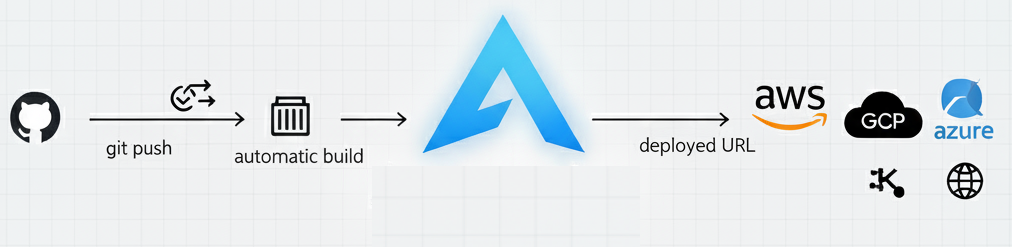
You'll build a production-grade platform that delivers Git-push deployments with automatic TLS certificates, preview URLs, and complete observability—all running on infrastructure you own and control. Unlike hosted PaaS platforms, you'll be building on Kubernetes with full deployment control. That means you can run any workload: microservices (with or without public endpoints), stateful databases, WebSockets, long-running background jobs, AI/ML model training and serving, or traditional web applications in any language. You get the simple developer experience with complete architectural control.
How operations work: The infrastructure industry is moving toward an agentic era—AI agents autonomously handling complex workflows (MCP, A2A, multi-agent orchestration). We're heading toward infrastructure that self-configures, self-heals, and self-optimizes. We're not there yet, but Nova brings you AI-assisted operations today with human-in-the-loop. Day 1 (this guide): You build the platform. Day 2 (ongoing): Nova analyzes issues, diagnoses problems, recommends fixes—you approve. As AI matures, more becomes autonomous.
This is a comprehensive, production-ready blueprint. We cover everything from architecture to production deployment with complete working examples, security, compliance, and troubleshooting.