From Git Push to Production: Your Own Self-Hosted Platform

In this guide, you'll build your own Vercel-like platform on Kubernetes in ~30 minutes:
- You'll deploy an EKS cluster with kpack (auto-builds), cert-manager (TLS), external-dns (DNS), and nginx-ingress
- You'll configure automatic Git push → build → live HTTPS deployment (just like Vercel)
- You'll run any workload: web apps, APIs, databases, microservices, background jobs, in any language
- You'll add security scanning, compliance controls, and observability for production
- You'll use Nova to debug, troubleshoot, and operate your platform
Perfect for building internal developer platforms, launching SaaS products, or meeting enterprise compliance requirements.
Introduction
You want the simplicity of "push code, get a live URL" (the developer experience Vercel pioneered) but with full control over your deployment, infrastructure, and compliance. This guide shows you how to build that experience on your own AWS infrastructure using AstroPulse and open-source tools: kpack, cert-manager, external-dns, and nginx-ingress.
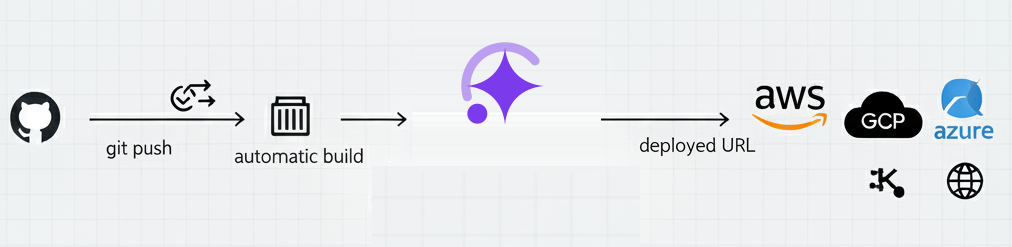
You'll build a production-grade platform that delivers Git-push deployments with automatic TLS certificates, preview URLs, and complete observability, all running on infrastructure you own and control. Unlike hosted PaaS platforms, you'll be building on Kubernetes with full deployment control. That means you can run any workload: microservices (with or without public endpoints), stateful databases, WebSockets, long-running background jobs, AI/ML model training and serving, or traditional web applications in any language. You get the simple developer experience with complete architectural control.
How operations work: The infrastructure industry is moving toward an agentic era: AI agents autonomously handling complex workflows (MCP, A2A, multi-agent orchestration). We're heading toward infrastructure that self-configures, self-heals, and self-optimizes. We're not there yet, but Nova brings you AI-assisted operations today with human-in-the-loop. Day 1 (this guide): You build the platform. Day 2 (ongoing): Nova analyzes issues, diagnoses problems, recommends fixes, and you approve. As AI matures, more becomes autonomous.
This is a comprehensive, production-ready blueprint. We cover everything from architecture to production deployment with complete working examples, security, compliance, and troubleshooting.
- ⚡ Want the fast track? Jump to the setup walkthrough (platform deploys in 30 minutes)
- 🎯 Looking for specific topics? Use the navigation guide below to jump to what you need
- 📚 Want to understand every detail? Read through. It is structured as a comprehensive step-by-step walkthrough
Navigation Guide
Everything you need is here. Jump to any section:
Three Platform Use Cases, One Architecture
The same technical architecture serves three completely different use cases. Whether you're building an internal developer platform for your engineering teams, launching a SaaS product to compete with Render or Fly.io, or meeting strict enterprise compliance requirements for healthcare or finance, the underlying platform is identical. What changes is simply the branding, access controls, and compliance configurations, not the core technology stack.
Internal Developer Platform
Give your teams self-service deployments without building a whole platform engineering team to maintain it
SaaS Product
Brand and sell to customers, just like Render and Fly.io started. Your platform, your pricing
Enterprise Platform
Meet data sovereignty, HIPAA, SOC2, PCI-DSS, or FedRAMP requirements for regulated industries
This flexibility is possible because AstroPulse handles all the complex Kubernetes orchestration while exposing simple, declarative configuration. You don't need deep infrastructure expertise, just a cloud account, a domain you control, and the willingness to follow a guided setup process.
Before You Begin: Prerequisites
What you'll need:
- AstroPulse Account - Complete the Getting Started guide
- Cloud Account (AWS or GCP) - For this guide: AWS account with permissions to create EKS, VPC, ECR, Route53, IAM roles. Managed EKS and GKE, plus self-hosted Kubernetes clusters on AWS and GCP are fully supported.
- Domain name that you own and can configure nameservers for
That's it! The setup process will guide you through everything else.
Understanding PaaS Architecture
Modern PaaS platforms handle the complete application lifecycle from source code to production:
From Source to Production: Git integration with automatic deployments. Auto-detect frameworks and build containers. Automatic TLS certificates and DNS. Preview environments for every branch/PR.
Beyond Web Apps: Stateless services (APIs, web servers). Stateful workloads (databases, message queues). Background jobs and workers. Microservices without public endpoints.
Production Operations: Security scanning and vulnerability detection. Compliance auditing and access controls. Monitoring, logging, and alerting. Cost tracking and resource quotas.
This guide focuses on the deployment pipeline (source → build → deploy). Security scanning, compliance, and advanced operations are covered in separate guides.
The deployment flow:
Developer pushes code → Webhook triggers → Framework detected → Image built → App deploys → HTTPS URL ready
This guide shows you how to build the deployment pipeline. Security, compliance, and billing are optional add-ons you can integrate later.
Why Build Your Own Platform?
Hosted PaaS platforms popularized the "git push → live URL" workflow. But as organizations scale or need specific capabilities (microservices, stateful workloads, deployment control), three critical factors drive them to build their own platforms: cost, compliance, and ownership.
Cost Savings
At scale, commercial PaaS pricing becomes prohibitive. Running on your own infrastructure saves 50-70% at 100+ developers while maintaining the same developer experience
Compliance & Sovereignty
HIPAA, SOC2, PCI-DSS, FedRAMP requirements often prohibit third-party PaaS. Your own platform means data never leaves your control and audit trails are complete
Full Ownership
No vendor lock-in, no usage limits, no surprise pricing changes. Deploy on AWS, GCP, Azure, or on-premises. Your infrastructure, your rules, your timeline
But here's the traditional problem: Self-hosted platforms require dedicated platform engineering teams to build and maintain. That's where the economics break down for most organizations.
Until now.
Historically, enterprises used managed platforms like Vercel because building and operating infrastructure was too complex and expensive, even if it meant compromising on ownership, cost, compliance, and control.
The AI shift: With AI-assisted operations (like Nova), the operational complexity that forced companies toward managed platforms is now manageable. Enterprises can own their infrastructure without massive platform engineering teams.
The reality: Even with AI, foundational layers (deployment orchestration, build systems, security scanning) are still hard to build from scratch. AstroPulse provides these hard-to-build foundations + Nova handles the complex day-to-day operations = Ownership + control + cost savings WITHOUT the operational burden.
Start building now. As AI matures toward full autonomy, you'll own the infrastructure while AI eliminates the toil.
The Secret Weapon: Nova
Here's what makes this approach fundamentally different: Nova acts like an AI platform engineer and SRE, reducing the load on a dedicated platform team.
Debug Production Issues
Nova reads your cluster logs, understands your setup, identifies root causes, and guides you to fixes, all through natural conversation
Handle Incidents 24/7
2 AM production down? Nova diagnoses issues, provides remediation steps, and walks you through recovery with less operational overhead
Simplify Operations
Security scanning, compliance setup, cost optimization: Nova guides you through complex tasks and generates configurations automatically
This changes the economics of self-hosted platforms. You get much closer to Vercel-like simplicity on your own infrastructure with less platform engineering overhead.
The AI-powered future: Today, Nova works with human-in-the-loop approval. As AI capabilities advance, more incidents, maintenance steps, and optimizations can be automated. Organizations building their own platforms now will be in a better position to adopt that automation as it matures.
Getting Started: Your Foundation
Now that you understand what you're building and why it matters, let's look at what AstroPulse already provides out of the box, and what we'll add to complete the platform.
What You Already Have with AstroPulse
The good news is that AstroPulse already provides most of the infrastructure needed for a production-grade deployment platform:
Infrastructure Layer
Kubernetes (EKS, GKE, AKS, Self-Hosted)
Deploy and manage EKS and GKE clusters with unified astroctl interface. Self-hosted Kubernetes clusters on AWS and GCP also fully supported
Application Deployment
Deploy from container images, Helm charts, Git repositories, or raw YAML with full lifecycle management
Nova Intelligence
AI-powered guidance for deployments, troubleshooting, and optimization
Unified Management
Single pane of glass for all clusters, applications, and deployments across environments
As demonstrated in the astro-platform-apps repository, AstroPulse excels at:
- Cluster provisioning with full control over compute, networking, and security
- Application lifecycle management through declarative YAML configurations
- Multi-environment deployments with profiles for dev, staging, and production
- Integrated observability with Prometheus, Grafana, and OpenTelemetry
Build Layer
AstroPulse prioritizes flexibility: you can deploy from container images, Helm charts, or raw YAML. This gives you full control over how applications are built and packaged.
For a Vercel-like experience (git push → automatic build → deploy), you need a source-to-image build layer. You can use:
- kpack (Cloud Native Buildpacks) - what we'll use in this guide
- Tekton (custom CI/CD pipelines)
- Jenkins X (GitOps-focused builds)
- Your own in-house build system (whatever works for you)
The key is separation: AstroPulse handles deployment, your build layer handles source → container image.
Using kpack for This Guide
kpack is a Kubernetes-native build service that uses Cloud Native Buildpacks. We'll use it in this guide because it's simple and Kubernetes-native, but you can swap it for any build technology.
Why kpack?
Kubernetes Native
Runs directly in your AstroPulse-managed cluster using CRDs and standard Kubernetes primitives
Auto-Rebuild
Automatically rebuilds images when source code changes OR when base images/buildpacks are updated
No Dockerfile Needed
Uses Cloud Native Buildpacks to detect and build applications automatically (Node.js, Python, Go, Java, etc.)
Production Ready
Built by the Paketo/Cloud Foundry community with enterprise-grade buildpacks and security practices
How kpack Works
kpack extends Kubernetes with custom resources:
- ClusterStack: Defines the base images (build and run)
- ClusterStore: Collection of buildpacks for different languages/frameworks
- ClusterBuilder: Combines stack + store into a reusable builder
- Image: Links your Git repo to a builder and destination registry
When you create an Image resource, kpack:
- Pulls your source code from Git
- Detects the application type (Node.js, Python, Go, etc.)
- Selects the appropriate buildpacks
- Builds a production-ready container image
- Pushes it to your container registry
- Automatically rebuilds on code or base image changes
Multi-Language Support: kpack automatically detects and builds applications in Node.js, Python, Java, Go, .NET, Ruby, PHP, and more, with zero configuration. No Dockerfile required. Just push your code, and kpack handles the rest using Cloud Native Buildpacks.
Platform Architecture
Here's how all the pieces fit together:
Complete Setup Walkthrough
This section covers the entire platform setup from infrastructure to application deployment. We'll approach this from two personas:
👷 Platform Engineer
What they build: The platform infrastructure itself
One-time setup:
- Deploy Kubernetes cluster (EKS, or self-hosted on AWS/GCP)
- Install kpack, cert-manager, external-dns, nginx-ingress
- Configure Application Profiles
- Set up IAM roles and permissions
Repository: developer-platform blueprint
Focus: Infrastructure, security, compliance, platform reliability
💻 Application Developer
What they deploy: Their applications on the platform
Daily workflow:
- Write application code
- Add
.astropulse/folder to their repo - Push code → GitHub Actions deploys automatically
- Monitor deployments
Repository: latency-app
Focus: Application features, deployment speed, developer experience
Platform Engineer: Setup Infrastructure
The platform's files live in the developer-platform blueprint of astro-platform-apps, beside the cluster and add-on examples it builds on. Follow the three steps below; each one shows the file it applies.
Step 1: Create Your Kubernetes Cluster
⏱️ Time: ~15-20 minutes | 📍 Progress: Step 1 of 3
First, provision an EKS cluster. The clusters folder of astro-platform-apps has templates for EKS, GKE, AKS and self-hosted clusters.
This example uses AWS EKS, but AstroPulse supports Kubernetes across multiple cloud providers including managed EKS and GKE, plus self-hosted Kubernetes clusters on AWS and GCP.
📚 Documentation:
- Cluster Management Guide - All supported configurations
- EKS Networking Architecture - VPC, subnets, and networking details
- Data Plane Configuration - Node group specifications
💻 Using CLI (astroctl)
Start from the EKS template for a new VPC:
📝 What You Need to Customize
<YOUR_CLUSTER_NAME>,<YOUR_REGION>and<YOUR_AWS_ACCOUNT_ID>- your cluster name, AWS region and account ID- Node groups - Adjust
minNode/maxNode, or add node groups for builds and applications
Connect the account first: astroctl cloud aws connect --account-id <YOUR_AWS_ACCOUNT_ID> --cluster-name <YOUR_CLUSTER_NAME> --region <YOUR_REGION>.
View clusters/aws/eks/new-vpc.yaml - EKS Cluster Configuration
Create the cluster:
$ astroctl infra k8s apply -f clusters/aws/eks/new-vpc.yaml
Why separate node groups? As the platform grows, a node group for builds keeps CPU-heavy kpack builds from slowing your services, and a node group for applications sizes independently of the platform's own components. Add them under nodeGroups when you need them.
🤖 Using Nova
Example Nova prompts:
💬 "I need a production Kubernetes cluster on AWS for running a PaaS platform with kpack builds. What node groups and instance types should I use?"
💬 "Generate an EKS cluster configuration for us-west-2 with separate node groups for system services, builds, and applications"
💬 "What's the recommended cluster sizing for 50+ concurrent build jobs and 100 deployed applications?"
Nova can help with: Recommending optimal node instance types based on your workload, generating cluster YAML configurations with proper taints and labels, explaining networking and security best practices for multi-tenant platforms, and estimating monthly costs for different cluster configurations.
Real Answer: For 50+ concurrent builds and 100 apps, Nova might suggest: 3-5 m5.large for system, 5-15 m5.xlarge for builds, 10-30 m5.xlarge for apps. Cost varies by cloud provider, region, and whether you use spot/reserved instances.
💬 "Create a production EKS cluster configuration for us-west-2 with separate node groups for system services, kpack builds, and application workloads"
Nova can generate the complete cluster YAML with proper node taints, labels, and sizing recommendations.
Create Application Profile:
After the cluster is provisioned, create an Application Profile to deploy applications to this cluster:
View platform-profile.yaml - Application Profile
$ astroctl app profile apply -f blueprints/developer-platform/platform-profile.yaml
An Application Profile connects your applications to a specific cluster. All application YAML files reference this profile via profileName: platform. This allows you to deploy the same application configuration to different environments (dev, staging, prod) by simply changing the profile name.
Step 2: Install the Platform Add-ons
⏱️ Time: ~10 minutes | 📍 Progress: Step 2 of 3
TLS, DNS and ingress are managed add-ons: you set a few options and AstroPulse installs, upgrades and monitors them. On an EKS cluster AstroPulse created, cert-manager and external-dns run as the cluster's own IAM roles, so there is no IAM stack to deploy and no credential in any file. Every file below is in the add-ons folder.
Certificates and DNS records are issued for a domain you own. You need:
- A registered domain and access to update its nameservers at your registrar
- A Route 53 hosted zone for it, with your registrar's nameservers pointing at the zone
- The domain verified in AstroPulse under Integrations > Domains (
astroctl domain add your-domain.com, thenastroctl domain verify your-domain.com)
Deploy cert-manager
cert-manager issues and renews TLS certificates. This file creates Let's Encrypt issuers that prove domain ownership through Route 53 (DNS-01), which wildcard certificates need.
Before deploying: set <YOUR_CLUSTER_NAME>, your email and <YOUR_HOSTED_ZONE_ID>. On a cluster AstroPulse created, delete the identity block: cert-manager uses the cluster's own role.
View add-ons/cert-manager-letsencrypt-dns.yaml - cert-manager
$ astroctl infra k8s addons apply -f add-ons/cert-manager-letsencrypt-dns.yaml
Set issuerType: LetsEncryptStaging to test your setup without hitting Let's Encrypt rate limits, then switch to LetsEncrypt for trusted certificates.
Deploy external-dns
external-dns keeps DNS records in your Route 53 zone in step with the hostnames your applications use.
📝 What You Need to Customize
clusterName- your clusterdomainFilter- your domainidentity- delete it on a cluster AstroPulse created; elsewhere, the IAM role external-dns runs as
View add-ons/external-dns.yaml - Automatic DNS Management
$ astroctl infra k8s addons apply -f add-ons/external-dns.yaml
Deploy nginx-ingress
nginx-ingress routes HTTP and HTTPS traffic to your applications through a cloud load balancer.
Preview and app subdomains (e.g., latency-app-xyz.your-domain.com) need a wildcard certificate (*.your-domain.com). Uncomment wildcardCertificate in the file and set its domain: the add-on requests the certificate through cert-manager and serves it for every application whose TLS mode is Wildcard. First issuance can take a few minutes while DNS propagates.
View add-ons/nginx-ingress.yaml - HTTP/HTTPS Routing
$ astroctl infra k8s addons apply -f add-ons/nginx-ingress.yaml
💬 "Install cert-manager, external-dns and nginx-ingress on my cluster for my-domain.com"
Nova can apply the add-ons with your approval and check their health.
Step 3: Deploy the Build Platform
⏱️ Time: ~10 minutes | 📍 Progress: Step 3 of 3
Deploy kpack
kpack is the core component that provides source-to-image builds using Cloud Native Buildpacks.
View applications/kpack.yaml - Deploy kpack Build Controllers
$ astroctl app apply -f blueprints/developer-platform/applications/kpack.yaml && astroctl app status kpack
💬 "Deploy kpack v0.18.0 with Cloud Native Buildpacks for automatic application builds from source code"
Nova can deploy and configure kpack with the right buildpacks for your tech stack via MCP.
Configure kpack build infrastructure
📝 What You Need to Customize
- Fork astro-platform-apps: the builder application reads its manifests from your fork
<YOUR_GITHUB_ORG>- Inapplications/kpack-builder.yamlandresources/kpack/cluster-builder.yaml: your fork and registry (ghcr.io/<YOUR_GITHUB_ORG>/kpack-builder)- Registry Secret - Create
registry-credentialsin thekpacknamespace, asresources/kpack/service-account.yamlshows
View applications/kpack-builder.yaml - Deploy kpack Configurations via GitOps
$ astroctl app apply -f blueprints/developer-platform/applications/kpack-builder.yaml
💬 "Configure kpack ClusterStack, ClusterStore, and ClusterBuilder for Node.js, Python, Go, Java, and other popular languages"
Nova generates complete kpack configurations with all necessary buildpacks.
✅ Why Deploy via AstroPulse Applications?
- Declarative: All infrastructure is YAML-defined and version-controlled
- Unified Management: Use
astroctl appandastroctl infra k8s addonscommands to manage everything consistently - Lifecycle Management: Easy updates, rollbacks, and monitoring
- Multi-Cluster: Same configs work across dev, staging, production
- GitOps Ready: Integrate with your CI/CD pipelines
Instead of manually running helm/kubectl commands, everything is managed as an AstroPulse Application with full lifecycle support.
Application Developer: Daily Workflow
⏱️ Time: ~15 minutes first deploy | ~3-5 minutes subsequent deploys
Now that the platform is ready, let's see how application developers use it to deploy their apps.
The .astropulse/ Standard
Every application follows the same folder structure:
$ tree -L 3 -a my-app/
my-app/
├── src/                      # Your application code
├── .astropulse/              # Deployment configuration
│   ├── profile.yaml          # Application profile (connects to cluster)
│   ├── build-app.yaml        # AstroPulse Application (build)
│   ├── deploy-app.yaml       # AstroPulse Application (deploy)
│   └── resources/
│       └── kpack-image.yaml  # kpack build config
└── .github/                  # GitHub Actions (optional)
│   └── workflows/
│       └── deploy.yml        # Automated deployment workflow
Why this pattern?
- ✅ Consistent - Every app uses the same structure
- ✅ Self-contained - All deployment config lives with your code
- ✅ GitOps native - Config is version controlled
- ✅ Self-service - Developers deploy independently
Complete Example: latency-app
Let's walk through a complete example using our latency-app repository.
The complete flow:
- Create application profile → connects app to cluster
- Deploy kpack Image resource → kpack builds container
- Deploy application → AstroPulse creates all resources
- Your app is live with HTTPS!
File 1: Application Profile
View .astropulse/profile.yaml - Application Profile
The application profile connects your app to a specific cluster. Update clusterName to match your cluster name from platform setup. This profile is separate from the platform services profile (platform), giving you isolation and flexibility.
File 2: Build Configuration
View .astropulse/build-app.yaml - Build Configuration
File 3: kpack Image Resource
View .astropulse/resources/kpack-image.yaml - kpack Build Config
File 4: Deployment Configuration
View .astropulse/deploy-app.yaml - Deployment (type: image)
File 5: GitHub Actions Automation
View .github/workflows/deploy.yml - Automated Deployment
💬 "Generate a complete .astropulse/ folder structure for my Node.js application with automatic builds and deployment"
Nova creates all four configuration files customized for your application. Learn more →
📝 What You Need to Customize
- Cluster Name - In
.astropulse/profile.yaml- Match your cluster from platform setup - Profile Name - In
.astropulse/build-app.yamland.astropulse/deploy-app.yaml - AWS Account ID & Region - In
.astropulse/deploy-app.yamland.astropulse/resources/kpack-image.yaml - Domain Name - In
.astropulse/deploy-app.yaml- Replaceyour-domain.com - Git Repository URL - In
.astropulse/build-app.yamland.astropulse/resources/kpack-image.yaml
See the latency-app README for detailed instructions.
💬 "Deploy my latency-app application using the .astropulse/ configuration and verify it's running with TLS"
Nova handles the entire deployment flow and verifies all components are working.
Before you start: Setup your application
⚠️ One-Time Setup Required
First time setup:
- Fork the latency-app repository to your GitHub account
- Clone your fork locally
- Read the README.md - It contains detailed instructions for customizing all values
- Update configuration in
.astropulse/files:- Cluster name in
profile.yaml - AWS Account ID & Region
- Your domain name
- Your Git repository URL (your fork, not the original)
- Cluster name in
- Commit and push your changes to your fork
- Deploy once manually to verify everything works:
Terminalastroctl app profile apply -f .astropulse/profile.yamlastroctl app apply -f .astropulse/build-app.yamlastroctl app apply -f .astropulse/deploy-app.yaml
After this initial setup, the Git workflow becomes fully automated!
Developer workflow (after setup):
The Vercel-like experience - just push code:
$ # Make changes to your application
vim main.go

# Commit and push
git add .
git commit -m 'Add new feature'
git push origin main

# That's it! kpack automatically:
# 1. Detects Git commit
# 2. Builds new container image
# 3. Pushes to ECR with :latest tag
# 4. GitHub Actions (if enabled) deploys automatically
What happens automatically:
- kpack watches your Git repo - Detects new commits on
mainbranch - Builds container image - Uses Cloud Native Buildpacks (3-5 min)
- Pushes to registry - Updates
your-registry.com/paas-apps/latency-app:latest - GitHub Actions deploys - (If enabled) Waits for build, then deploys new image
The GitHub Actions workflow builds and deploys with both :latest and Git SHA tags for production-grade deployments:
On every push, the workflow:
-
Builds image with dual tags - kpack pushes to both
:latestand:<git-sha>(e.g.,:a1b2c3d)YAML# kpack builds and pushes both tags automaticallytag: xxx.dkr.ecr.us-west-2.amazonaws.com/paas-apps/latency-app:latestadditionalTags:- xxx.dkr.ecr.us-west-2.amazonaws.com/paas-apps/latency-app:a1b2c3d -
Deploys using Git SHA tag - Updates
deploy-app.yamlto use the versioned tagYAML# Deployment uses the specific Git SHA, not :latestimage:tag: a1b2c3d # Production-grade: reproducible, auditable, rollback-friendly
Why both tags?
:latest- For manual testing and development workflows:<git-sha>- For production deployments with reproducibility and easy rollbacks
Manual deployment: Use :latest tag (already configured in the repo files)
astroctl app apply -f .astropulse/deploy-app.yaml # Uses :latest
Automated deployment: GitHub Actions automatically uses Git SHA tags (production-grade)
See the full workflow implementation: .github/workflows/deploy.yml
The latency-app includes a GitHub Actions workflow (.github/workflows/deploy.yml):
Setup (one-time):
- Add
ASTROPULSE_API_KEYto GitHub Secrets - Update trigger: change
workflow_dispatchtopush: branches: [main]
Then every push to main automatically:
- ✅ Waits for kpack to finish building
- ✅ Deploys new image to your cluster
- ✅ Verifies deployment is running
- ✅ Zero-downtime rolling update
The workflow is disabled by default - you can deploy manually with astroctl app apply or enable it for full GitOps automation.
For private registries, use IRSA (AWS) / Workload Identity (GCP) / Managed Identity (Azure) for image pulls, falling back to imagePullSecrets where needed. Manage application secrets via External Secrets Operator to avoid storing credentials in manifests.
Security & Compliance
AstroPulse gives you the foundation: The base platform (cluster, DNS, TLS, application deployment, monitoring).
Production-grade platforms need security: Vulnerability scanning, policy enforcement, and compliance controls are critical for production workloads.
Deploy Vulnerability Scanning
Vulnerability Scanning is a managed add-on built on the Trivy Operator: it scans the images your workloads run and shows the findings on the cluster's Security tab.
View add-ons/vulnerability-scanning.yaml - Security Vulnerability Scanning
$ astroctl infra k8s addons apply -f add-ons/vulnerability-scanning.yaml
Deploy Kyverno
View applications/kyverno.yaml - Policy Enforcement Engine
$ astroctl app apply -f blueprints/developer-platform/applications/kyverno.yaml && astroctl app status kyverno
💬 "Deploy Kyverno for policy enforcement and admission control in Kubernetes"
Nova can help you write custom policies for your compliance requirements.
Deploy Security Policies
View resources/kyverno/require-trusted-registry.yaml - Security Policies
$ astroctl app apply -f blueprints/developer-platform/applications/kyverno-policies.yaml
💬 "Configure Kyverno policies to block container images with CRITICAL vulnerabilities and enforce security best practices"
Nova helps you customize policies for HIPAA, SOC2, PCI-DSS, or other compliance frameworks.
✅ What You Just Deployed
- ✅ Vulnerability Scanning - Automatically scans all running container images for known vulnerabilities
- ✅ Kyverno - Policy engine with admission control
- ✅ Security Policies, in Audit mode until the reports are clean:
- Require images from your registry
- Disallow the
latesttag
View vulnerability reports:
kubectl get vulnerabilityreports -A
kubectl get configauditreports -A
Your platform is now production-ready with:
- ✅ Continuous vulnerability scanning
- ✅ Policy enforcement at admission time
- ✅ Compliance-ready audit trails
- ✅ Security best practices enforced automatically
Observability Stack
Deploy a complete observability stack with Prometheus (metrics), Grafana (visualization), and ClickHouse (analytics database for logs/events).
- Platform configs:
blueprints/developer-platform/(kpack, Kyverno) andadd-ons/(cert-manager, external-dns, nginx-ingress) - Reusable observability apps:
applications/helm/(prometheus, grafana, clickhouse)
What You'll Monitor:
- Platform: cert-manager certificates, nginx-ingress requests, external-dns sync, kpack builds
- Applications: CPU/memory usage, HTTP latency, error rates, pod health
- Kubernetes: Node utilization, pod scheduling, network traffic, storage I/O
Deploy Observability Stack
⚠️ Different Folder - Requires Customization
Important: These observability apps are from the applications/helm/ folder, NOT from blueprints/developer-platform/.
You need to update each YAML file:
profileName- Set<YOUR_PROFILE_NAME>toplatformto deploy to your cluster
View deployment configurations
Deploy Grafana:
📝 What You Need to Customize
profileName-platform- To expose it - add the chart's
ingressvalues (enabled: true,ingressClassName: nginx,hosts: [grafana.your-domain.com]); external-dns creates the DNS record
View applications/helm/grafana/grafana.yaml - Grafana
$ astroctl app apply -f applications/helm/grafana/grafana.yaml
Access Grafana:
- Sign in as
admin. The chart generates the password into a Secret in themonitoringnamespace; the folder's README shows how to read it.
Import pre-built dashboards:
- Kubernetes cluster monitoring (ID: 7249)
- NGINX Ingress controller (ID: 9614)
Grafana is configured with persistent storage (10Gi) using your cluster's default storage class:
- EKS (AWS): Uses
gp2orgp3by default - GKE (Google Cloud): Uses
pd-standardby default - AKS (Azure): Uses
defaultstorage class
The PersistentVolumeClaim will be automatically created when Grafana is deployed.
💬 "Deploy and configure Prometheus, Grafana, and ClickHouse for my platform observability"
Nova can deploy these tools directly via MCP or guide you through manual deployment with production best practices. Learn more →
What you get:
- ✅ Continuous vulnerability scanning - Every image scanned automatically
- ✅ Policy enforcement - Security policies enforced at admission time
- ✅ Complete observability - Metrics, dashboards, and alerting
- ✅ Compliance ready - Audit trails and policy reports
- ✅ Production hardened - Enterprise-grade security and monitoring
Production Considerations
Before going live with your PaaS platform, here are the critical production hardening steps:
1. Container Registry Security
No AWS keys anywhere:
✅ Identities, not credentials
- On an EKS cluster AstroPulse created, cert-manager and external-dns run as the cluster's own IAM roles
- On any other cluster, each add-on runs as a workload identity you name in its
identityblock - kpack pushes with a registry token kept in a Kubernetes Secret on the cluster, never in Git
- Kyverno's trusted-registry policy keeps every workload on images from your registry
💬 "Review the IAM roles my add-ons run as and recommend least-privilege improvements"
Nova analyzes your infrastructure as code for security vulnerabilities.
2. Security Stack: Vulnerability Scanning + Policy Enforcement
✅ Security Best Practices
- Trivy Operator - Continuous vulnerability scanning of all container images
- Kyverno policies - Block deployments with CRITICAL vulnerabilities
- Policy enforcement - Require security labels, resource limits, and non-root containers
- Compliance reporting - Automated audit trails for SOC2/PCI-DSS/HIPAA
See the Security & Compliance section for deployment instructions.
💬 "Review my security policies and recommend improvements for compliance requirements"
Nova helps configure security scanning and policy enforcement for your compliance framework.
3. Build Performance & Cost Optimization
✅ Performance & Cost Features
- Build caching - ClusterBuilder with cache volumes for 10x faster rebuilds
- Resource limits - LimitRange policies prevent runaway build costs
- Spot instances - Build nodes use 70% spot instances (77% cost reduction)
- Auto-scaling - Node groups scale 1-10 based on actual build demand
Impact: First build takes 5 minutes, subsequent builds complete in 30-60 seconds. Optimized caching and spot instances significantly reduce costs.
💬 "Analyze my kpack build performance and recommend optimizations for faster builds and lower costs"
Nova identifies build bottlenecks and suggests caching strategies.
4. High Availability & Disaster Recovery
✅ HA Features Built-In
- Multi-AZ node groups - All node groups span 3 availability zones
- Minimum 2-3 replicas - System services run with HA configurations
- Pod anti-affinity - Critical services spread across zones
- GitOps for DR - All configurations in Git for instant recovery
💬 "Review my cluster configuration for high availability and disaster recovery best practices"
Nova validates your HA setup and suggests improvements for resilience.
5. Complete Cost Breakdown
Infrastructure costs scale with usage (workload, not team size). Use spot instances and auto-scaling to optimize.
Traditional self-hosted platforms fail due to operational overhead: 2-5 platform engineers ($300K-1.25M/year), on-call rotations, maintenance toil, and burnout.
With AstroPulse + Nova: Infrastructure costs + subscription. Nova can reduce the amount of dedicated platform engineering time needed for debugging, maintenance, troubleshooting, and optimization.
Operations & Debugging
Traditional platforms require dedicated teams. This platform is different - Nova acts as your platform engineer, SRE, and on-call engineer.
How Nova Helps with Operations
- Debugging - "My build is failing" → Nova analyzes logs, identifies root cause, suggests fixes
- Troubleshooting - Certificate renewals, networking issues, performance problems → Nova diagnoses and resolves
- Optimization - Cost analysis, resource tuning, performance improvements → Nova recommends changes
- 24/7 Support - No on-call rotation needed, Nova is always available
You work via Nova, CLI, or UI - Choose what works best for each task.
Common Troubleshooting Scenarios
Build Failures
Check build status:
$ astroctl app get nodejs-build
astroctl app logs nodejs-build
💬 "My kpack build is failing with 'buildpack detect failed' error. Diagnose the issue and provide the fix."
Nova analyzes build logs and provides root cause analysis with fixes. Learn more →
Certificate Provisioning Issues
Check certificate status:
$ astroctl app get letsencrypt-issuer
astroctl app logs cert-manager
💬 "My Let's Encrypt certificate is stuck in Pending state. Troubleshoot DNS-01 challenge and fix the issue."
Nova debugs cert-manager and DNS configuration problems.
DNS Not Working
Verify DNS configuration:
$ astroctl app get external-dns
astroctl app logs external-dns
💬 "My application is deployed but DNS is not resolving. Troubleshoot external-dns and Route53 configuration."
Nova checks DNS records, nameserver delegation, and provider settings.
Application Deployment Errors
Check application status:
$ astroctl app get nodejs-app
astroctl app logs nodejs-app
💬 "My application deployment shows ImagePullBackOff error. Diagnose registry authentication and provide step-by-step fix."
Nova troubleshoots deployment issues and registry permissions.
Frequently Asked Questions
🤔 Why build your own when Vercel/Netlify exist?
Vercel brought incredible developer experience to the market. This platform brings that same simplicity to environments where managed services can't be used:
When you NEED your own platform:
- Air-gapped / On-premises: Government, defense, financial institutions with network isolation requirements
- Data Sovereignty: Healthcare (HIPAA), finance (SOX/PCI-DSS), EU data residency (GDPR)
- Enterprise Compliance: FedRAMP, SOC2, industry-specific regulations
- SaaS Product: Build and sell deployment services under your own brand (you can't resell Vercel)
- Internal Developer Platform: Give your teams Vercel-like experience on your infrastructure, your policies, your cloud accounts
- Multi-cloud / Hybrid: Need to run on AWS, GCP, Azure, and on-premises from one platform
The Problem: These environments traditionally meant hiring platform engineering teams, on-call rotations, and endless operational toil.
The Solution: AstroPulse + Nova gives you Vercel-like simplicity in your own environment, without the operational burden.
💰 What's the total cost of running this platform?
Cost depends on your scale and cloud provider:
- Small teams (10 devs): Modest infrastructure (few nodes, minimal auto-scaling)
- Medium teams (25-50 devs): Moderate infrastructure with auto-scaling
- Large teams (100+ devs): Production-grade with HA across multiple availability zones
What affects cost:
- Number of nodes (system, build workers, app runtime)
- Instance types (use spot instances for builds to save 60-70%)
- Auto-scaling configuration (aggressive vs conservative)
- High availability requirements (multi-AZ deployments)
- Cloud provider and region
Cost includes: Kubernetes control plane, compute instances, load balancers, DNS, data transfer
The real cost difference:
- Infrastructure cost: Predictable monthly cloud spend (scales with workload, not team size)
- Traditional operational cost: 2-5 platform engineers ($300K-1.25M/year) + on-call + toil
- With Nova: Infrastructure + AstroPulse subscription (lower platform engineering overhead)
Bottom line: Without Nova, you'd need a dedicated platform team making this approach expensive. With Nova handling operations, you get the platform without the operational burden.
🛡️ Is this production-ready? What about security and compliance?
Yes, production-ready. Deploy security and compliance in minutes:
Security Stack:
- Trivy Operator - CVE scanning, configuration audits, SBOM generation
- Kyverno - Policy enforcement (blocks privileged containers, requires resource limits, prevents HIGH/CRITICAL CVEs)
- Observability - Prometheus, Grafana, ClickHouse for metrics and monitoring
Production Features: Multi-AZ HA, automated TLS, IRSA/IAM best practices, network security, encryption at rest, audit logging, zero-trust networking.
Compliance Templates: Pre-configured Kyverno policies for HIPAA, SOC2, PCI-DSS, FedRAMP. Apply YAML files to enforce compliance requirements automatically.
🔧 What languages and frameworks are supported?
Automatically detected and built:
- Node.js - Express, Next.js, Nest.js, Fastify (14, 16, 18, 20, 22)
- Python - Django, Flask, FastAPI, Pyramid (3.8-3.12)
- Java - Spring Boot, Quarkus, Micronaut (8, 11, 17, 21)
- Go - Gin, Echo, Fiber, standard lib (1.18-1.22)
- And more - .NET, Ruby, PHP via Cloud Native Buildpacks
No Dockerfile required - Cloud Native Buildpacks detect and build automatically.
Custom builds: Use GitHub Actions, Jenkins, or any CI/CD tool you prefer.
⏱️ How long does it really take to set this up?
Platform infrastructure: 30 minutes
- Cluster creation: 8-10 minutes
- cert-manager, external-dns, nginx-ingress, kpack: 15-20 minutes
First application deployment: 15 minutes
- kpack build: 3-5 minutes
- Deployment + DNS + TLS: 5-10 minutes
Total: ~45 minutes from empty AWS account to first app live with HTTPS
Subsequent deployments: 3-5 minutes per app (with cached builds: 30-60 seconds)
📚 Do I need Kubernetes expertise?
No deep Kubernetes expertise required. AstroPulse abstracts most complexity:
What you DON'T need to know:
- Kubernetes API internals
- Custom Resource Definitions (CRDs)
- Advanced networking (CNI, service mesh)
- Helm chart development
What helps (but Nova can guide you):
- Basic YAML syntax
- Understanding of containers/images
- Git workflows
- DNS concepts (nameservers, A records)
Nova helps with: Cluster sizing, troubleshooting, optimizations, security best practices
🌐 Can I use this on GCP, Azure, or self-hosted Kubernetes instead of AWS?
Yes! The architecture is cloud-agnostic.
Current Support Status:
- AWS (EKS): Managed cluster provisioning available now ✅ Docs →
- AWS (Self-Hosted): Self-hosted Kubernetes clusters on AWS ✅ Docs →
- GCP (Self-Hosted): Self-hosted Kubernetes clusters on GCP ✅ Docs →
- GCP (GKE): Managed GKE cluster provisioning ✅ Docs →
- Azure (AKS): Managed AKS cluster provisioning ✅ Docs →
Connect any existing Kubernetes cluster (kubeadm, k3s, RKE, Rancher, OpenShift, etc.) on supported cloud providers. See the Cluster Management Guide for complete details.
Why is this cloud-agnostic?
Because everything runs on Kubernetes, which provides a unified API across all cloud providers. Whether you deploy to EKS (AWS), GKE (Google Cloud), AKS (Azure), or self-hosted Kubernetes, the platform components (kpack, cert-manager, nginx-ingress) see the same Kubernetes API.
How AstroPulse manages the cloud-specific complexity:
AstroPulse abstracts away the foundational differences between cloud providers so you don't have to deal with them:
- IAM Integration: IRSA (AWS) vs Workload Identity (GCP) vs Managed Identity (Azure): you write the same ServiceAccount config, AstroPulse handles the cloud-specific identity binding
- Load Balancers: AWS ALB annotations vs GCP GLB vs Azure LB: AstroPulse translates to the right cloud provider's load balancer
- Storage Classes: EBS (AWS) vs Persistent Disk (GCP) vs Azure Disk: unified storage configuration that maps to cloud-specific volumes
- Network Plugins: VPC CNI (AWS) vs Kubenet (Azure) vs GKE's native networking: Kubernetes networking works consistently across all
- DNS Integration: Route53 (AWS) vs Cloud DNS (GCP) vs Azure DNS: external-dns automatically syncs with the right provider
The value: Write once, deploy anywhere. You define your platform in YAML once, and AstroPulse handles translating that intent to work with your cloud provider's specifics. No rewrites when migrating between clouds.
What changes when switching clouds:
- Cluster provisioner: EKS → GKE or AKS (in cluster config only)
- DNS provider: Route53 → Cloud DNS or Azure DNS (external-dns config)
- Container registry: ECR → Artifact Registry or ACR (image URLs)
- Identity/Auth: IRSA → Workload Identity or Managed Identity (behind the scenes)
What stays exactly the same:
- kpack, cert-manager, external-dns, nginx-ingress (all cloud-agnostic Kubernetes tools)
- AstroPulse application management and deployment workflows
- Developer workflow (
.astropulse/pattern, Git push → deploy) - Nova troubleshooting and operations
- All your application manifests and configurations
The guide uses AWS for examples. The same architecture works identically on supported cloud providers (AWS, GCP, and Azure).
🔄 How do I handle updates and maintenance?
With AstroPulse's intent-based architecture, upgrading is simple: Edit YAML → Apply → Done. Zero downtime, automatic rollback on failures.
Traditional platforms: Multi-step procedures, maintenance windows, complex rollback plans. AstroPulse: Declare your intent in YAML, platform handles the rest.
Example: Upgrade Kyverno to a newer chart release
# blueprints/developer-platform/applications/kyverno.yaml
# Just change the version - that's your new intent!
spec:
  source:
    type: Helm
    helm:
      repo:
        repoURL: https://kyverno.github.io/kyverno
        chartName: kyverno
        chartVersion: 3.9.2  # ⬅️ Change to the release you want
$ # Apply your new intent
astroctl app apply -f blueprints/developer-platform/applications/kyverno.yaml

# AstroPulse handles everything:
# ✅ Fetches the new chart version
# ✅ Renders and applies the change
# ✅ Keeps a version you can roll back to
# ✅ Reports the application's health as it rolls out
Every component follows the same pattern:
- Update version in YAML (your new intent)
- Run
astroctl app apply -f <file> - AstroPulse orchestrates the upgrade safely
Built-in safety: Pre-flight checks, rolling updates, health monitoring, automatic rollback, full audit trail, GitOps ready.
Rollback: git revert HEAD && astroctl app apply -f <file>
Automated maintenance (zero manual intervention):
🤖 Self-Healing Platform
- cert-manager - Auto-renews TLS certificates (starts 90 days before expiry)
- external-dns - Auto-updates DNS records when Ingresses change
- Cluster auto-scaling - Automatically adds/removes nodes based on demand
- Self-healing - Failed pods automatically restart, unhealthy nodes replaced
- kpack - Auto-rebuilds applications when base images are updated (security patches)
- Security tools - If you add Trivy/Kyverno (via Nova), they maintain themselves
Your platform maintains itself. You only intervene when you want to change your intent (add features, upgrade versions, etc.).
Kubernetes upgrades: Use astroctl infra k8s upgrade <cluster-name> <version> to upgrade your cluster's Kubernetes version. See the Cluster Management Guide for details.
GitOps approach - disaster recovery built-in:
📦 Your Platform is Code
Because everything is YAML in Git:
- Disaster recovery - Rebuild entire platform from Git in 30 minutes
- Multi-environment - Same configs across dev/staging/prod (change profile name only)
- Code review - All changes go through pull requests
- Audit compliance - Full history of who changed what and when
- Automated testing - CI/CD validates configs before merging
Example: Complete data center failure? Spin up new cluster in different region, point to same Git repo, and your entire platform is restored in 30 minutes.
Review my platform upgrade plan for the Kyverno chart and validate for breaking changes
Nova analyzes upgrade paths, identifies potential issues, and suggests migration steps.
The key insight: With AstroPulse's intent-based approach, you declare what you want (version, configuration, features), and the platform figures out how to get there safely. No manual procedures, no tribal knowledge, no upgrade anxiety.
🚀 Can I white-label this for my customers?
Absolutely! That's one of the three primary use cases.
For a SaaS Product Platform:
- ✅ Brand it - Use your company branding, domain, and logos
- ✅ Monetize it - Charge customers for deployments
- ✅ Customize it - Add your own features and integrations
- ✅ Multi-tenant - Isolate customer workloads with namespaces
- ✅ Billing integration - Track usage per customer
Examples: Render and Fly.io all started this way.
Time to market: 30 min base platform + 1-2 weeks for multi-tenancy and billing integrations.
Conclusion
The key insight from this guide is how simple it is to build production-grade deployment platforms when you have the right foundation and the right AI platform engineer, bringing Vercel-like developer experience to environments where managed services can't be used.
This guide used AWS as an example, but the exact same architecture works on any cloud provider:
| Component | AWS | GCP | Azure | Self-Hosted |
|---|---|---|---|---|
| Kubernetes | EKS | GKE | AKS | Any K8s |
| DNS | Route53 | Cloud DNS | Azure DNS | Any DNS |
| Container Registry | ECR | Artifact Registry | ACR | Docker Hub, etc. |
| Identity/Auth | IRSA (IAM roles) | Workload Identity | Managed Identity | Service accounts |
What stays the same across ALL providers:
- kpack, cert-manager, external-dns, nginx-ingress
- AstroPulse application management
- Nova troubleshooting
- Developer workflow (
.astropulse/pattern)
With AstroPulse + open-source tools, you can build:
🏢 An Internal Developer Platform - Give your 100+ engineering teams self-service deployments. Deploy in 30 minutes, customize in 1-2 days.
💰 A SaaS Product Platform - Build a deployment platform as your product. Core platform in 30 minutes, multi-tenancy in 1-2 weeks.
🔒 An Enterprise Compliance Platform - Meet HIPAA, SOC2, PCI-DSS, FedRAMP requirements. Core platform in 30 minutes, compliance controls in 1-2 weeks.
What you get:
- ✅ Modern developer experience - Git push → automatic builds → live deployment with TLS
- ✅ Complete ownership - Your infrastructure, your branding, your monetization
- ✅ Multi-cloud flexibility - Deploy on AWS, GCP, Azure, or on-premises
- ✅ Cost efficiency - No per-seat fees, 50-80% cost reduction at scale
- ✅ AI-enhanced - Nova for troubleshooting and optimization
We've created a complete working example that you can deploy in 30 minutes:
→ developer-platform blueprint - the platform side, with:
- ✅ kpack, its builder and the Kyverno policies as AstroPulse applications
- ✅ A README with the order to apply them
- ✅ Cluster templates and managed add-ons beside it in the same repository
- ✅ The application side in latency-app
$ git clone https://github.com/astropulseinc/astro-platform-apps
cd astro-platform-apps/blueprints/developer-platform
cat README.md
Need help? Contact the AstroPulse team.
- AstroPulse Documentation - Deep dive into platform capabilities
- Nova Platform Engineering - AI-enhanced infrastructure management
- kpack Documentation - Kubernetes-native builds
- Cloud Native Buildpacks - Buildpacks ecosystem