10 posts tagged with "Cloud Native"

Cloud Native tag description

View All Tags

Your Startup Needs a Deployment Platform, Not a Platform Team

· 8 min read
Rajesh RC
Founder

Many startups begin with one application and a hosted deployment service. That is usually the right decision. The team can ship without first building networking, deployment automation, or an operations layer.

The requirements change as the company adds services, environments, enterprise customers, private networking, and infrastructure ownership. The team still needs a short path to production, but the applications now need to run in infrastructure the company controls.

AstroPulse gives growing engineering teams a repeatable path from code to production in infrastructure they control, without requiring them to build the platform themselves.

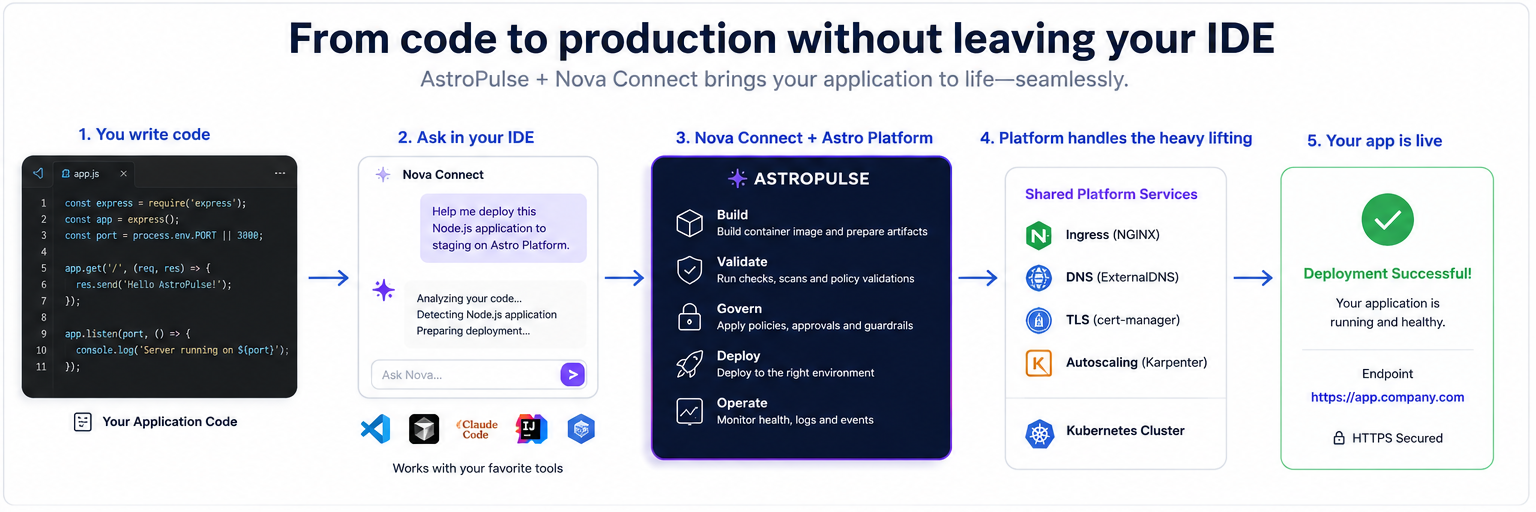
From code in an editor through Astro Platform services to a healthy application, with one platform reused across multiple services

From code in the editor to a healthy application, with one platform reused across multiple services.

Push to Your Own Domain: Managed Add-ons + Custom Domains

· 8 min read
Rajesh RC
Founder
TL;DR

Our earlier build-your-own-PaaS blueprint wired up ingress, TLS, and DNS by hand. Now it's three managed add-ons and one domain verification: install NGINX + cert-manager + ExternalDNS, verify a domain once, and every container image you deploy comes up on your own domain with real, auto-renewing HTTPS. Do it from the console, the CLI, or just ask your AI. All three drive the same platform.

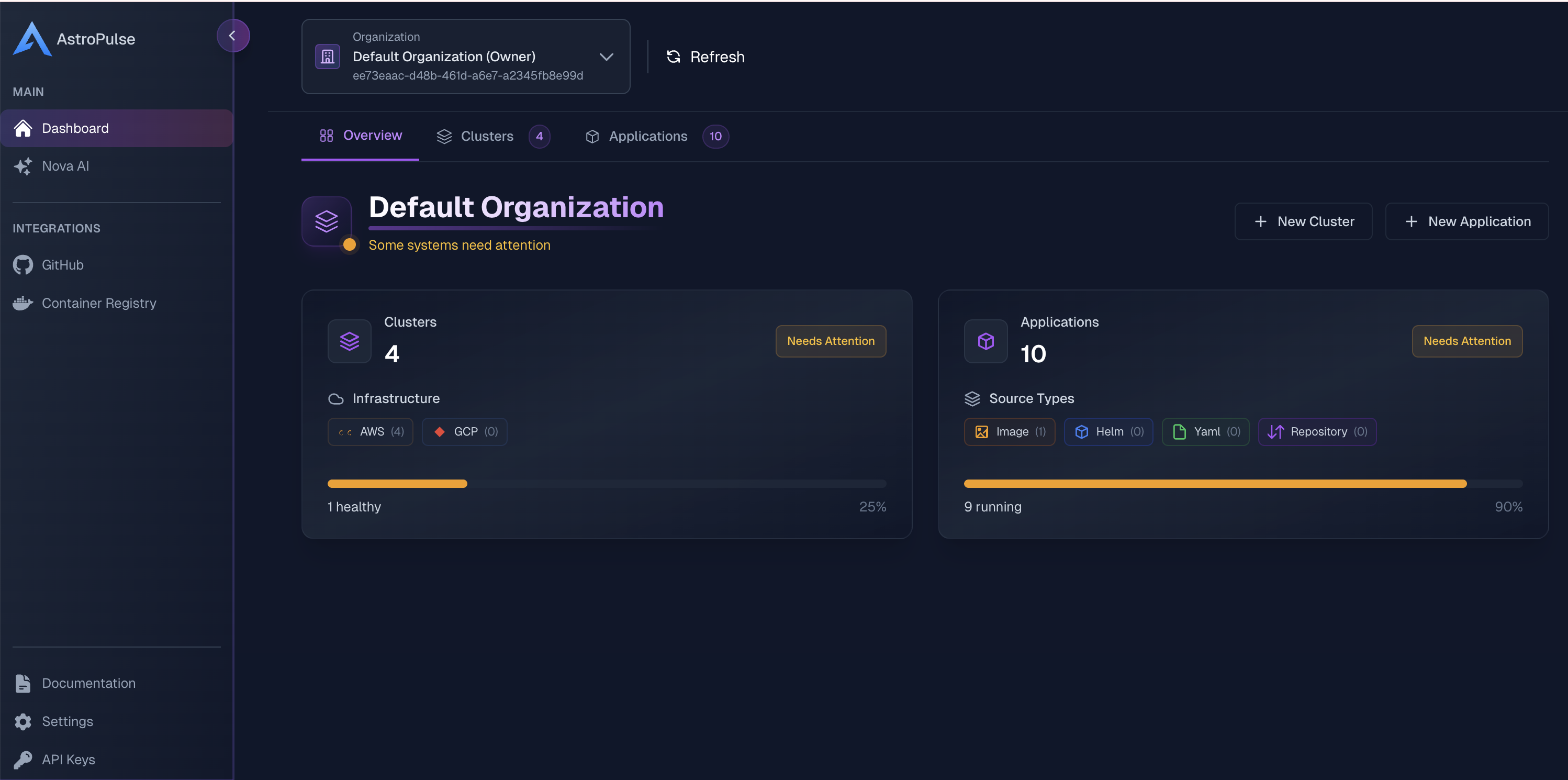
The AstroPulse console — clusters, applications, add-ons, and domains in one place

Three ways to follow along. Each step below leads with the console walkthrough, with the CLI and AI equivalents in the tabs underneath:

  • Console: point and click; the walkthroughs below are the real UI.
  • CLI: astroctl …, copy-paste ready.
  • AI: ask Nova in the console, or connect your editor's assistant to the AstroPulse MCP (platform.astropulse.io/mcp) and describe what you want. For building an image straight from a repo, the astro-deploy MCP does that too.

Before you start: one cluster with cloud identity

You need exactly one thing: a Kubernetes cluster connected to AstroPulse, running with the cloud's own identity — IRSA on AWS, Workload Identity on GCP/Azure. That identity is what lets ExternalDNS manage DNS and cert-manager solve ACME challenges without ever handling a cloud credential.

The easy path is to let AstroPulse provision the cluster. It wires that identity up for you:

Connect your cloud, then provision (identity configured for you)
$ # one-time: connect your cloud account astroctl cloud aws connect --account-id 123456789012 --region us-east-1 --cluster-name prod # provision the cluster — IRSA / Workload Identity is set up automatically astroctl infra k8s apply -f cluster.yaml

Already run your own cluster? Register it instead, then set up the identity per the add-on docs:

Terminal
$ astroctl infra k8s register --cluster-name my-cluster

Step 1: Install the three add-ons

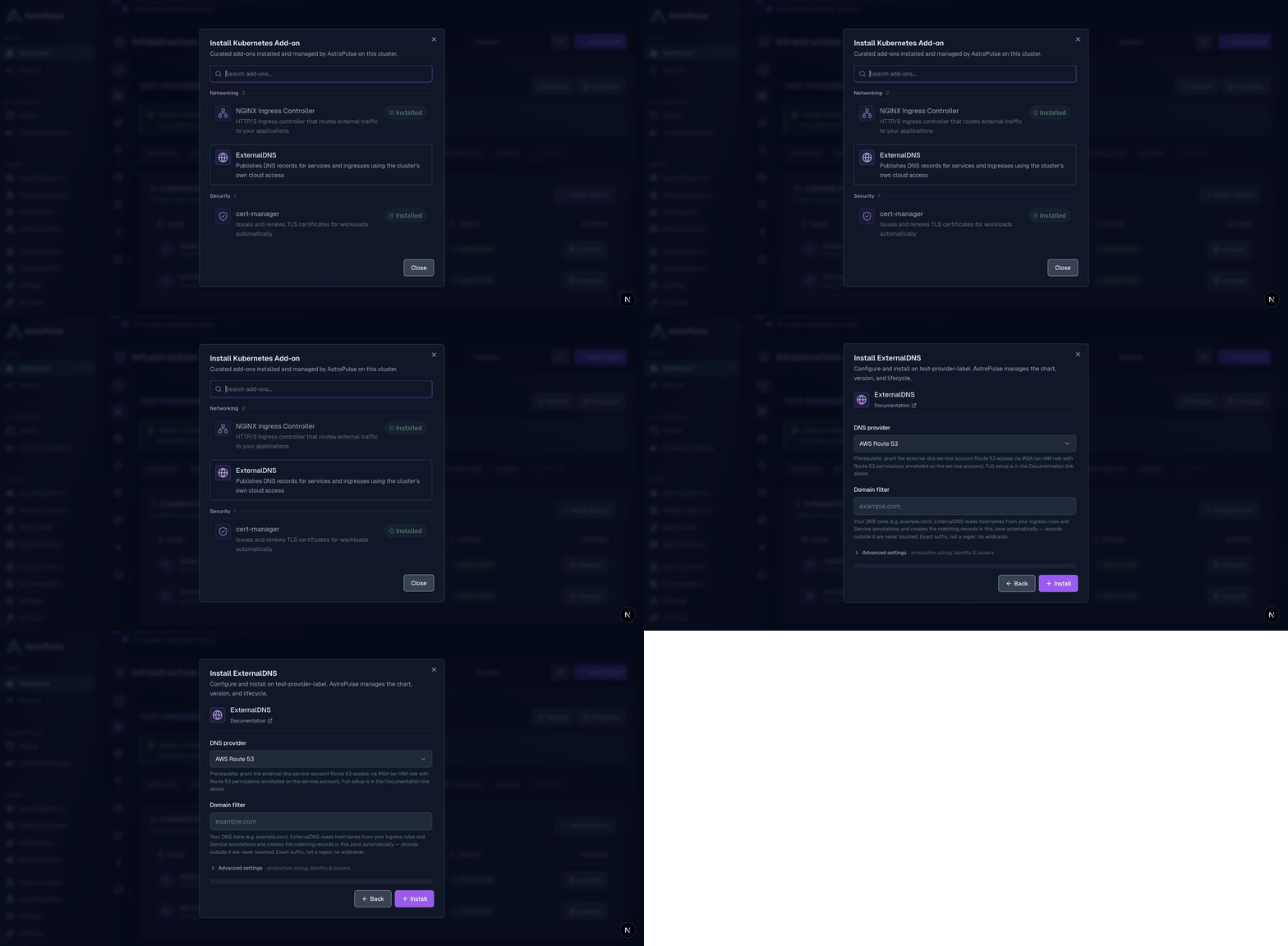
On your cluster's Add-ons tab, choose Install Add-on and pick from the catalog. Each installs with production-sensible defaults; you tune only what matters.

Installing an add-on from the catalog — pick it, review the defaults, install
  • NGINX Ingress: routes public traffic. The default terminates TLS at the ingress (there's a passthrough option for backends that terminate their own). On a cloud cluster it comes up behind a real LoadBalancer with the right provider annotations already set.
  • cert-manager: issues and renews TLS certificates. Turn on Create a Let's Encrypt ClusterIssuer and add a contact email for real, auto-renewing public certificates, with no manual cert wrangling.
  • ExternalDNS: publishes DNS records for your apps. Pick your DNS provider and set the domain filter to your zone (e.g. example.com). It uses the cluster identity from the prerequisite step, so no keys are ever stored.

Prefer YAML? The same add-ons apply declaratively. Copy-paste the example manifests:

Apply add-ons and watch them go healthy
$ astroctl infra k8s addons apply -f nginx-ingress.yaml astroctl infra k8s addons apply -f cert-manager.yaml astroctl infra k8s addons apply -f external-dns.yaml astroctl infra k8s addons get prod # all add-ons + health

Installed together, they compose into automatic, production-grade HTTPS: cert-manager solves the ACME challenge through NGINX, ExternalDNS creates the DNS record, and NGINX terminates TLS at the edge with the issued certificate. Certificates renew themselves.

Step 2: Verify your domain, once

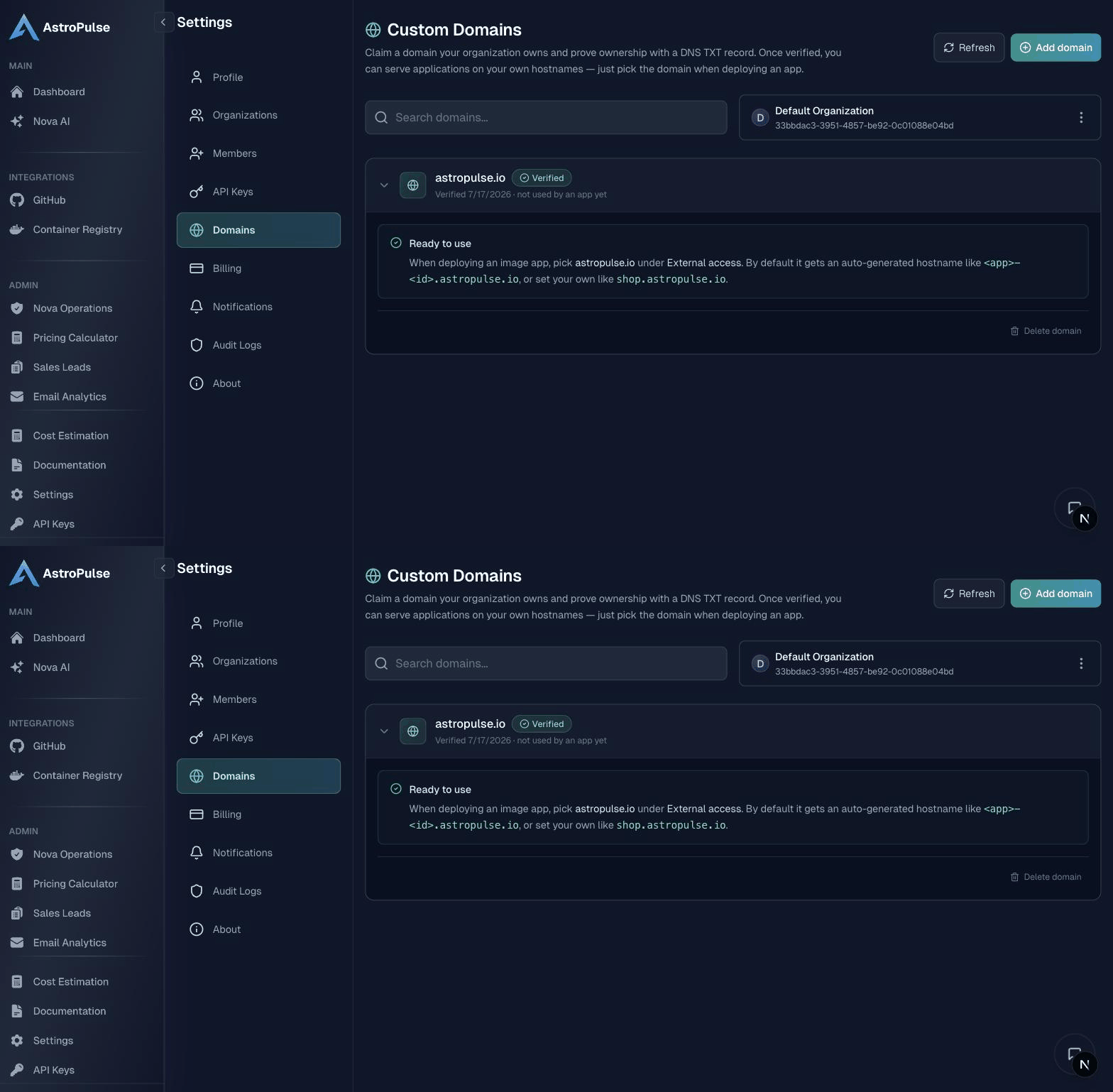
In Settings → Domains, add a domain you control and publish the TXT record it shows you. Once it verifies, every internet-facing app can serve on it, on a hostname you choose (shop.example.com) or an auto-generated one.

Adding a domain, publishing the TXT record, and watching it verify
Claim and verify a domain
$ astroctl domain add example.com # prints the TXT record to publish astroctl domain verify example.com # run once DNS has propagated

See Custom Domains for the details.

Step 3: Deploy a container image on your domain

Custom domains attach to Container Image applications; that's the exposure model. Here's a ready-made image so you can watch the whole thing light up:

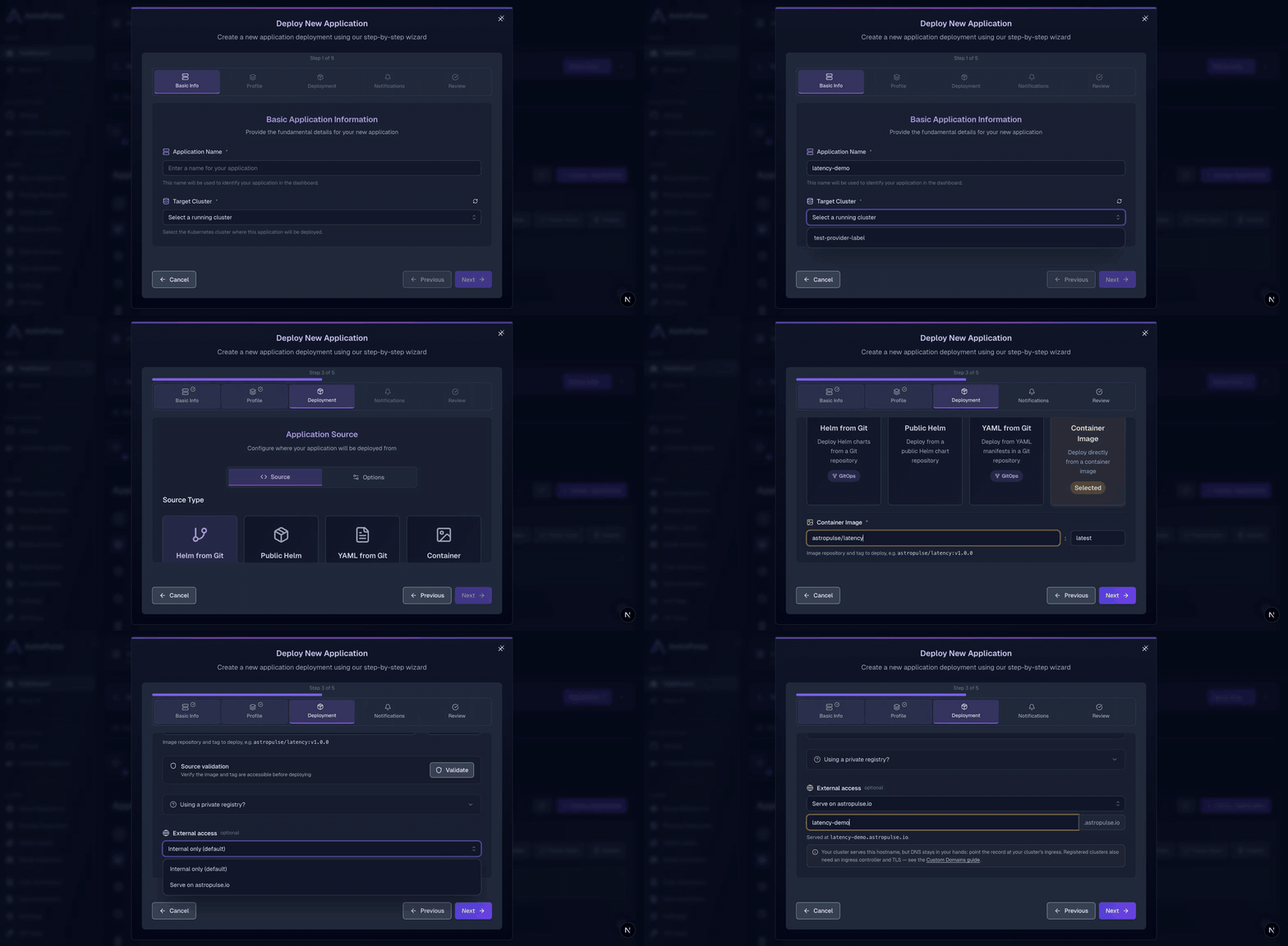
Deploy wizard: Container Image astropulse/latency:v1.0.0, then choose a verified domain and hostname under External access
  1. Deploy Application → Container Image, image astropulse/latency:v1.0.0.
  2. Under External access, pick your verified domain and a hostname (or leave it blank to auto-generate <app>-<id>.example.com).
  3. Deploy.

Within a minute or two the app is running, its DNS record and TLS certificate are created for you, and it's live on https://<your-host>.example.com.

Deploy an image app on a verified domain
$ cat <<'EOF' | astroctl app apply -f - apiVersion: platform.astropulse.io/v1 kind: Application spec: name: latency-demo profileName: <YOUR_PROFILE_NAME> # list: astroctl app profile get source: type: image image: registry: docker.io repository: astropulse/latency tag: v1.0.0 externalAccess: domain: example.com # verified domain → latency-demo-<id>.example.com EOF

Test it locally: no cloud needed

Want to validate the wiring before touching a cloud account? The whole flow runs on a local kind cluster, with a few local swaps:

  • NGINX: install it with Expose via NodePort (Advanced settings). kind has no cloud LoadBalancer, so the controller is reachable on a node port instead. That's the only local-vs-cloud difference.
  • cert-manager: enable a self-signed ClusterIssuer: no ACME account, no public DNS, no email. It's Ready offline, which is all you need to prove the TLS path.
  • ExternalDNS: skip it locally; it needs a real cloud DNS zone.

Deploy any container image with an ingressClassName: nginx Ingress and it's reachable through NGINX exactly as it would be through a cloud LoadBalancer in production. Full steps are in the add-on docs' local testing section.

The point

The blueprint still stands if you want to own every piece. But the ingress, TLS, and DNS plumbing is now something AstroPulse installs, keeps healthy, and upgrades for you, reachable from a console, a CLI, or a sentence to your AI. Push an image, get a live URL on your own domain with real HTTPS. That's the whole idea.


The AstroPulse Journey

· 4 min read
Rajesh RC
Founder

When I started AstroPulse, the problem was easy to name and hard to live with: teams moving to the cloud were drowning in tools. Every provider had its own consoles, its own primitives, its own way to deploy an app and stand up a cluster. The work that mattered, shipping software, kept getting buried under the work of operating it.

I wanted one place to deploy an application and run a cluster, on any cloud, without learning five different platforms first. That was the beginning. Everything since has been built on top of that one idea, one layer at a time.

From Git Push to Production: Your Own Self-Hosted Platform

· 57 min read
Rajesh RC
Founder
TL;DR: What You'll Build

In this guide, you'll build your own Vercel-like platform on Kubernetes in ~30 minutes:

  • You'll deploy an EKS cluster with kpack (auto-builds), cert-manager (TLS), external-dns (DNS), and nginx-ingress
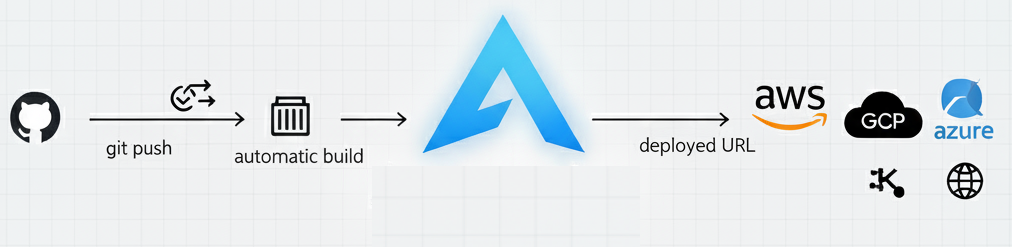
  • You'll configure automatic Git push → build → live HTTPS deployment (just like Vercel)
  • You'll run any workload: web apps, APIs, databases, microservices, background jobs—any language
  • You'll add security scanning, compliance controls, and observability for production
  • You'll use Nova to debug, troubleshoot, and operate your platform

Perfect for building internal developer platforms, launching SaaS products, or meeting enterprise compliance requirements.

Introduction

You want the simplicity of "push code, get a live URL"—the developer experience Vercel pioneered—but with full control over your deployment, infrastructure, and compliance. This guide shows you how to build that experience on your own AWS infrastructure using AstroPulse and open-source tools: kpack, cert-manager, external-dns, and nginx-ingress.

AstroPulse PaaS Flow Architecture

You'll build a production-grade platform that delivers Git-push deployments with automatic TLS certificates, preview URLs, and complete observability—all running on infrastructure you own and control. Unlike hosted PaaS platforms, you'll be building on Kubernetes with full deployment control. That means you can run any workload: microservices (with or without public endpoints), stateful databases, WebSockets, long-running background jobs, AI/ML model training and serving, or traditional web applications in any language. You get the simple developer experience with complete architectural control.

How operations work: The infrastructure industry is moving toward an agentic era—AI agents autonomously handling complex workflows (MCP, A2A, multi-agent orchestration). We're heading toward infrastructure that self-configures, self-heals, and self-optimizes. We're not there yet, but Nova brings you AI-assisted operations today with human-in-the-loop. Day 1 (this guide): You build the platform. Day 2 (ongoing): Nova analyzes issues, diagnoses problems, recommends fixes—you approve. As AI matures, more becomes autonomous.

📖 About This Guide

This is a comprehensive, production-ready blueprint. We cover everything from architecture to production deployment with complete working examples, security, compliance, and troubleshooting.

  • Want the fast track? Jump to our automated setup script (platform deploys in 30 minutes)
  • 🎯 Looking for specific topics? Use the navigation guide below to jump to what you need
  • 📚 Want to understand every detail? Read through—it's structured as a comprehensive step-by-step walkthrough

Meet Nova - Your AI Platform Engineer

· 7 min read
Rajesh RC
Founder

Platform engineering represents the natural evolution of DevOps and SRE principles, but it faces a fundamental challenge: how do you scale platform expertise across an entire organization without requiring every developer to become a cloud expert?

This is where Nova comes in — your AI platform engineer that makes infrastructure accessible to everyone through natural conversation.

The Platform Engineering Evolution

DevOps broke down silos → SRE brought engineering rigor to operations → Platform Engineering created self-service infrastructure → Nova makes platform engineering conversational and accessible to everyone.

The Platform Engineering Challenge: Scale vs. Expertise

Platform engineering promised to solve the "you build it, you run it" scaling problem by creating Internal Developer Platforms (IDPs). But even the best platforms face fundamental limitations:

👥

Expert Bottlenecks

Platform teams become the new constraint—everyone depends on their expertise

📚

Documentation Decay

Complex systems require constant documentation that quickly becomes outdated

🧠

Context Loss

Critical operational knowledge lives in tribal knowledge, not systems

⚙️

Cognitive Load

Developers still need to understand infrastructure concepts to use platforms effectively

The Core Issue

We've built self-service platforms, but we haven't solved the underlying problem of democratizing platform engineering expertise.

Enter Nova: Your AI Platform Engineer

Nova is an AI platform engineer that helps you manage infrastructure through natural conversation. Ask questions, get answers, generate configurations, and troubleshoot issues — all through simple chat.

What makes Nova different:

  • Works with your existing tools (Slack, GitHub, AWS, Terraform, Kubernetes, and more)
  • Available however you want to work — browser, self-hosted, or in your editor
  • Extensible through Skills and MCP integrations

What Can Nova Do?

💰

Cloud Cost Estimation

Calculate costs across AWS, Google Cloud, and Azure before you deploy

⚙️

Infrastructure Code Generation

Generate Terraform, Helm charts, and Kubernetes manifests through conversation

🔍

Troubleshooting

Debug infrastructure issues with AI-powered analysis and recommendations

🔗

Tool Integration

Connect Slack, GitHub, and your existing tools for seamless workflows

Example conversations:

  • "How much would 10 t3.medium instances cost per month in us-west-2?"
  • "Generate Terraform for an EKS cluster with autoscaling"
  • "Why is my pod crashing in the production namespace?"
  • "Create a Helm chart for a Node.js app with Redis"

Three Ways to Use Nova

Nova is available however you prefer to work:

Nova Cloud

Zero setup — just start chatting.

Go to Open Nova → and start asking questions. We handle everything.

  • Full access to all Skills (Slack, GitHub, AWS, Terraform, and more)
  • Conversation history and cross-device sync
  • No installation required

Nova Direct

Self-hosted with complete control.

Run Nova on your infrastructure via Docker. Your data and runtime stay in your environment.

  • Browser-based local interface
  • MCP Marketplace to add integrations
  • Add any MCP servers you need
  • Air-gapped environment support

Nova Connect

Nova in your favorite editor.

Use Nova through the hosted remote MCP endpoint in tools like Claude Code, Cursor, VS Code, Claude Desktop, and other OAuth-capable MCP clients.

  • Hosted remote MCP for editor and CLI clients
  • Managed sign-in through the hosted OAuth flow
  • Same Nova capabilities in your development workflow

Extensible by Design

Nova's power comes from its extensibility. Connect the tools you already use:

Available Skills:

  • Cloud Providers — AWS, Google Cloud, Azure cost calculations and resource management
  • Communication — Slack integration for team collaboration
  • Development — GitHub for code search, issues, and PRs
  • Infrastructure — Terraform and Helm configuration generation
  • Kubernetes — Cluster management and troubleshooting
  • And more — Add any MCP server for custom integrations
Bring Your Own Tools

Nova Direct includes the built-in MCP Marketplace for custom integrations. Nova Connect works through standard MCP-compatible clients, so teams can bring Nova into existing editor and CLI workflows without running the server locally.

The Vision: Platform Engineering for Everyone

The evolution from DevOps → SRE → Platform Engineering → AI-Assisted Platform Engineering represents more than technological progress — it's about democratizing expertise that has historically been scarce and expensive.

Traditional Model

  • Small teams of platform experts serve entire organizations
  • Knowledge bottlenecks create deployment delays
  • Scaling requires hiring more specialists
  • Critical knowledge lives in people, not systems

Nova Model

  • Platform expertise available to every team member
  • Knowledge scales instantly without hiring
  • Best practices consistently applied
  • Operational knowledge captured and improved

Get Started

Podcast: Deep Dive into Cloud Infrastructure Management

· 2 min read
Rajesh RC
Founder

Welcome to our technical deep-dive podcast where we explore how Astro Platform is transforming cloud infrastructure management. Join us as we discuss the challenges, solutions, and future of cloud computing with industry experts.

Watch the video version:

Episode Highlights

The Cloud Evolution

According to Gartner's prediction highlighted in our discussion, by 2025, over 95% of new digital workloads will be deployed on cloud-native platforms, up from 30% in 2021. This dramatic shift underscores the urgency for efficient cloud management solutions.

Key Challenges Addressed

  • Multiple tool management across different cloud providers
  • Complex Kubernetes orchestration
  • Resource optimization and cost management
  • Security and compliance maintenance

Astro Platform Solutions

  1. Unified Management Interface

    • Single dashboard for all cloud providers
    • Simplified Kubernetes cluster management
    • Integrated monitoring and logging
  2. Cost Optimization with AI

    • Resource usage analysis
    • Automated scaling recommendations
    • Potential savings of up to $320,000 annually for mid-sized enterprises
  3. Security and Future-Proofing

    • Proactive security measures
    • Adaptable architecture for emerging technologies
    • Support for serverless computing integration
Get Started

Ready to simplify your cloud infrastructure? Check out our platform documentation to begin your journey.

Additional Resources

For those interested in exploring topics discussed in this episode:

Contact Us

For more information or to speak directly with our team, please contact us.

Leveraging AI Agents to Slash Operational Costs

· 5 min read
Rajesh RC
Founder

In today's competitive business landscape, operational efficiency isn't just a goal—it's a necessity. Companies are constantly seeking ways to reduce costs while maintaining high levels of performance and scalability. Cloud infrastructure management, while offering flexibility, often comes with its own set of financial challenges. This is where Astro Platform's AI-powered solutions make a transformative difference.

The Financial Burden of Traditional Cloud Operations

Before diving into how Astro Platform can help, it's essential to understand the financial implications of traditional cloud management:

  • Over-Provisioning Resources: Companies often allocate more resources than needed to avoid downtime, leading to wasted expenditure. According to CloudZero, businesses waste up to 32% of their cloud spend due to underutilization of resources.
  • Underutilization: Idle resources that aren't scaled down contribute to unnecessary costs. The same CloudZero report indicates that 32% of cloud spend is wasted due to underutilization.
  • Operational Overheads: Manual monitoring, scaling, and troubleshooting require significant human resources, adding to operational expenses.
  • Security Risks: The average cost of a data breach in 2023 was about $4.45 million, highlighting the financial importance of robust cloud security measures.

Astro Platform's AI Agents: Your Cost-Saving Allies

Astro Platform integrates advanced AI agents specifically designed to tackle these financial challenges head-on.

1. Intelligent Cost Optimization

  • AI-Assisted Resource Management: The AI agents analyze application usage patterns and provide actionable insights for optimizing computing resources. This collaborative approach helps teams make informed decisions about resource allocation, with humans retaining control over final adjustments.
  • Automated Optimization with Safeguards: For less critical systems, AI can implement automatic resource adjustments within predefined parameters. This process includes human approval workflows for significant changes, ensuring a balance between efficiency and control.
  • Financial Impact: By leveraging AI insights and controlled automation to guide resource optimization, companies can significantly reduce over-provisioning and potentially lower cloud expenses by up to 30%.

2. Predictive Scaling and Capacity Planning

  • Demand Forecasting: The AI models predict future resource needs based on historical data and trends.
  • Financial Impact: Prevents both over-investment in infrastructure and potential revenue loss due to under-resourced systems during peak times.

3. Automated Monitoring and Proactive Troubleshooting

  • Early Issue Detection: AI agents monitor system health metrics and detect anomalies before they escalate into costly downtimes.
  • Financial Impact: Reducing downtime even by a fraction can save thousands to millions of dollars, depending on the business size.

4. Security Management and Compliance Automation

  • Automated Compliance Checks: Ensures that all deployments meet industry-specific regulations, avoiding potential fines.
  • Financial Impact: Mitigates the risk of non-compliance penalties, which can be significant. According to the CloudZero report, the average cost of a data breach in 2023 was about $4.45 million.

5. Streamlined DevOps and SRE Operations

  • AI-Assisted Deployment: Automates routine tasks such as Helm/YAML generation, reducing the workload on developers.
  • AI-Assisted Troubleshooting: AI agents can analyze logs and metrics to identify the root cause of incidents faster than manual methods.
  • Financial Impact: Lowers labor costs by enabling your technical teams to focus on strategic projects rather than repetitive tasks.

Case in Point: Realizing Tangible Savings

Let's consider a mid-sized enterprise spending $1 million annually on cloud infrastructure:

  • Resource Optimization Savings: By reducing wasted cloud spend (which averages 32% according to CloudZero), the company could save up to $320,000 per year.
  • Security Cost Reduction: By preventing potential data breaches, which cost an average of $4.45 million in 2023, the company mitigates significant financial risk.
  • Operational Efficiency Savings: Automating tasks and improving resource utilization can reduce labor costs by an estimated 15-20%, leading to substantial annual savings.

Potential Annual Savings: Over $320,000 in direct cloud costs, plus 15-20% reduction in operational labor expenses and risk mitigation of multi-million dollar security breaches.

This example illustrates how Astro Platform's AI-driven solutions can directly impact a company's bottom line, turning potential losses into tangible savings across multiple areas of operations.

Why Astro's AI is a Game-Changer

  • Self-Learning Algorithms: The more the AI agents operate within your environment, the better they become at optimizing for cost and performance.
  • Scalable Solutions: Whether you're a startup or an enterprise, Astro's AI scales with your needs, ensuring cost-efficiency at every stage.
  • Transparent Reporting: Provides detailed reports on cost savings and optimization opportunities, empowering you to make informed financial decisions.

Aligning Technology with Financial Strategy

Astro Platform doesn't just offer technological advancements; it aligns cloud operations with your financial objectives:

  • Budget Adherence: Set financial targets, and let the AI ensure your cloud spending stays within budget.
  • ROI Maximization: Accelerate your return on cloud investments by reducing unnecessary expenses.
  • Competitive Advantage: Reinvest the savings into innovation, giving your business an edge in the market.

Conclusion

In a world where operational costs can make or break profitability, leveraging AI to optimize cloud infrastructure is no longer optional—it's imperative. Astro Platform stands at the forefront of this revolution, offering AI-driven solutions that deliver significant financial benefits.

Optimizing Cloud Operations

· 3 min read
Rajesh RC
Founder

In the rapidly evolving digital landscape, businesses are under constant pressure to innovate while managing costs and operational complexities. Cloud infrastructure, while offering immense potential, brings its own set of challenges—resource optimization, multi-cloud management, efficient application deployment, and maintaining robust security measures. Astro Platform addresses these challenges with a comprehensive and innovative approach.

Introducing Astro Platform

Astro Platform is designed to empower businesses to navigate these challenges with ease and efficiency. Here's how Astro can transform your cloud operations:

Dynamic Resource Optimization

Traditional approaches to resource allocation often lead to over-provisioning or under-utilization, impacting both performance and costs. Astro Platform intelligently adjusts your cloud resources based on actual application usage patterns.

Business Benefit: Achieve optimal performance while minimizing costs by ensuring resources align precisely with demand.

Simplified Multi-Cloud Management

Managing multiple cloud environments can be complex and time-consuming. Astro provides a unified interface to manage your cloud resources across major providers seamlessly.

Business Benefit: Reduce operational overhead and complexity by controlling all your cloud environments from a single platform.

Accelerated Application Deployment

Speed is crucial in today's market. Astro streamlines the deployment process, allowing your teams to deliver applications faster without compromising on quality.

Business Benefit: Increase your time-to-market and stay ahead of the competition by deploying applications swiftly and efficiently.

Enhanced Operational Efficiency with AI Assistance

Astro leverages advanced AI capabilities to automate routine tasks and provide intelligent insights.

  • For Developers: Simplify development workflows and reduce manual effort.
  • For Operations Teams: Gain actionable recommendations for cost savings, scaling, and security enhancements.

Business Benefit: Boost productivity across your teams and focus on strategic initiatives rather than routine maintenance.

Robust Security and Compliance

In an era where security threats are increasingly sophisticated, Astro ensures your cloud infrastructure adheres to the highest security standards.

Business Benefit: Protect your business assets and maintain customer trust by proactively managing security and compliance.

Why Astro Platform?

Astro is not just a tool—it's a strategic partner in your business growth. By addressing key operational challenges, Astro enables you to:

  • Reduce Costs: Optimize resource utilization to save on cloud expenses.
  • Improve Efficiency: Automate processes and reduce manual workloads.
  • Scale Easily: Adapt quickly to changing business demands.
  • Strengthen Security: Maintain robust security protocols effortlessly.

Conclusion

Astro Platform offers a transformative approach to cloud infrastructure management. By focusing on delivering tangible business benefits without the complexity, Astro allows you to concentrate on what you do best—growing your business.