Networking Details
This section provides a detailed overview of the networking architecture for managed Kubernetes clusters provisioned by the Astro Platform.
AWS EKS Networking
The EKS cluster is designed to provide a secure and scalable environment for deploying and running applications. It follows a well-defined architecture to ensure high availability, security, and performance.
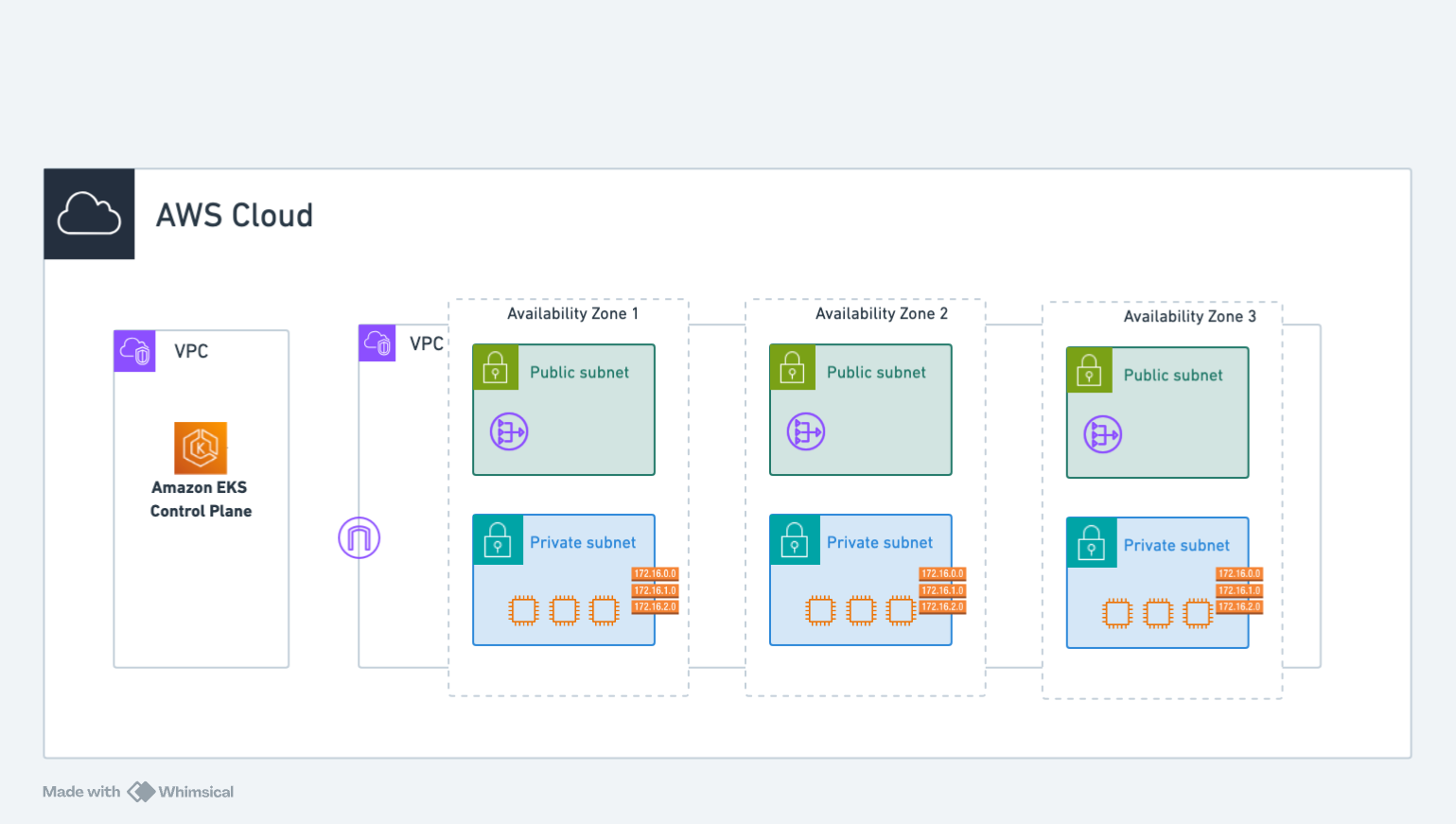
The architecture diagram above illustrates the networking setup for AWS EKS clusters provisioned by the Astro Platform. The EKS cluster is deployed in a VPC with a private subnet and a public subnet. The private subnet is used to deploy the worker nodes and the public subnet is used to deploy the load balancers and other public-facing services like NAT gateway.
EKS Subnet Model
EKS uses per-zone subnets - each Availability Zone has its own subnet pair (public + private).
Google GKE Networking
GKE uses VPC-native networking with regional subnets and secondary IP ranges for pods and services.
For more details, see the Google Cloud VPC-native clusters documentation.
GKE Subnet Model
GKE uses regional subnets - a single subnet spans all zones in a region:
┌─────────────────────────────────────────────────────────────────────┐
│  GCP Project                                                        │
│  ┌───────────────────────────────────────────────────────────────┐  │
│  │  VPC Network                                                  │  │
│  │  ┌─────────────────────────────────────────────────────────┐  │  │
│  │  │  Regional Subnet (spans ALL zones)                      │  │  │
│  │  │                                                         │  │  │
│  │  │  Primary Range: 10.0.0.0/20 ──────────────► Nodes       │  │  │
│  │  │  Secondary Range "pods": 10.4.0.0/14 ─────► Pod IPs     │  │  │
│  │  │  Secondary Range "services": 10.0.16.0/20 ► Service IPs │  │  │
│  │  │                                                         │  │  │
│  │  │  ┌─────────────┬─────────────┬─────────────┐            │  │  │
│  │  │  │   zone-a    │   zone-b    │   zone-c    │            │  │  │
│  │  │  │  [nodes]    │  [nodes]    │  [nodes]    │            │  │  │
│  │  │  └─────────────┴─────────────┴─────────────┘            │  │  │
│  │  └─────────────────────────────────────────────────────────┘  │  │
│  └───────────────────────────────────────────────────────────────┘  │
└─────────────────────────────────────────────────────────────────────┘
Key Differences: EKS vs GKE vs AKS Networking
| Feature | AWS EKS | Google GKE | Azure AKS |
|---|---|---|---|
| Subnet Scope | Per-zone | Regional (spans all zones) | Regional, single subnet (spans all zones) |
| Pod IPs | From subnet CIDR or custom CIDR | Secondary IP ranges on subnet | Overlay CIDR (default) or VNet IPs (Azure CNI) |
| Service IPs | Cluster internal | Secondary IP ranges on subnet | Cluster internal |
| BYO Network Config | subnets map with zone keys | subnet with name and range names | single vnetSubnetId (full subnet resource ID) |
| Default Plugin | VPC CNI | VPC-native | Azure CNI Overlay |
GKE VPC-Native Networking
GKE clusters use VPC-native networking, which means:
- Alias IP Ranges: Pods get IP addresses from secondary ranges configured on the subnet
- Direct VPC Routing: Pod-to-pod traffic is routed natively through the VPC
- Better Integration: Pods can directly communicate with other GCP services using their VPC IP addresses
- Network Policies: Calico-based policies for micro-segmentation
Azure AKS Networking
AKS selects its networking model with the networkPlugin field. The platform defaults to Azure CNI in overlay mode, the recommended production configuration. When networkPlugin is azure and no mode is set, the platform applies overlay mode automatically.
AKS Network Plugins
| Plugin | networkPlugin | Pod IP source | When to use |
|---|---|---|---|
| Azure CNI Overlay (default) | azure (overlay mode) | Separate overlay CIDR, not the VNet | Recommended. Conserves VNet IP space while keeping native VNet integration for nodes |
| Azure CNI | azure | Each pod gets a routable VNet IP | When pods must be directly reachable from the VNet. Requires a larger subnet |
| Kubenet | kubenet | Separate pod network behind NAT | Minimal VNet IP usage. Pods are not directly addressable from the VNet |
AKS Subnet Model
Like GKE, AKS uses a single regional subnet that spans every availability zone in the region. Azure VNets and subnets are regional resources, not per-zone like EKS, so all node pools draw their node IPs from that one subnet. Two things distinguish AKS from GKE:
- Pod IPs (overlay default): pods get IPs from a separate, Azure-managed overlay CIDR instead of named secondary ranges on the subnet, so the subnet only needs room for nodes and a modest subnet is sufficient. With non-overlay Azure CNI, each pod instead consumes a routable IP from the subnet, so the subnet must be sized for nodes plus pods.
- Reference by resource ID: for BYOVNet you point the cluster at the subnet with its full Azure resource ID, rather than naming a subnet plus secondary ranges.
┌───────────────────────────────────────────────────────────────────────┐
│  Azure VNet (regional)  -  e.g. 10.224.0.0/16                         │
│  ┌─────────────────────────────────────────────────────────────────┐  │
│  │  Single subnet  -  regional, spans ALL availability zones       │  │
│  │  Subnet CIDR 10.224.0.0/24  ───────────►  Node IPs              │  │
│  │                                                                 │  │
│  │  ┌──────────┬──────────┬──────────┐                             │  │
│  │  │  zone-1  │  zone-2  │  zone-3  │                             │  │
│  │  │ [nodes]  │ [nodes]  │ [nodes]  │                             │  │
│  │  └──────────┴──────────┴──────────┘                             │  │
│  └─────────────────────────────────────────────────────────────────┘  │
│                                                                       │
│  Overlay Pod CIDR 10.244.0.0/16  (Azure-managed, NOT in VNet)         │
│       └──────────────────────────►  Pod IPs                           │
│  Service CIDR    10.0.0.0/16     (cluster-internal)                   │
└───────────────────────────────────────────────────────────────────────┘
The CIDRs above are Azure's defaults for overlay mode; the platform does not override them unless you bring your own VNet.
Bring Your Own VNet (BYOVNet)
For BYOVNet you provide one value, the full Azure subnet resource ID:
/subscriptions/{subscription-id}/resourceGroups/{resource-group}/providers/Microsoft.Network/virtualNetworks/{vnet}/subnets/{subnet}
This single identifier already encodes the subscription, resource group, VNet, and subnet, so there is nothing else to provide. The subnet's resource group may differ from the cluster's resource group. See the AKS BYOVNet guide for the az commands to create a VNet and read its subnet ID.
Restricting API Server Access
Use authorizedIPRanges to restrict access to the Kubernetes API server to a set of CIDR blocks (up to 200 entries). Requests originating outside these ranges are rejected.
CIDR Reference
RFC 1918 Private Address Ranges
EKS, GKE, and AKS support RFC 1918 private address ranges for VPC/Network configuration:
| Range | CIDR Block | Available IPs | Recommended Use |
|---|---|---|---|
| Class A | 10.0.0.0/8 | 16,777,216 | Large enterprise clusters |
| Class B | 172.16.0.0/12 | 1,048,576 | Medium clusters (172.16.x - 172.31.x) |
| Class C | 192.168.0.0/16 | 65,536 | Small clusters, development |
Recommended CIDR Allocations
| Resource | EKS | GKE | AKS | Notes |
|---|---|---|---|---|
| VPC/Network | /16 | /16 | /16 (VNet) | 10.0.0.0/16 or 172.16.0.0/16 |
| Subnet (nodes) | /19 - /24 per zone | /20 regional | /24 (overlay) or larger | AKS uses one regional subnet |
| Pods | VPC CNI (from subnet) | /14 secondary range | Overlay CIDR, Azure-managed (10.244.0.0/16 default) | AKS overlay pods are not in the VNet; non-overlay Azure CNI draws pod IPs from the subnet |
| Services | /16 (cluster internal) | /20 secondary range | Azure-managed (10.0.0.0/16 default) | Cluster internal |
| Control Plane | AWS managed | /28 (exactly) | Azure managed | GKE masterIPv4CidrBlock |
Provider-Specific CIDR Requirements
AWS EKS:
- VPC CIDR:
/16to/28prefix length - Subnet CIDR: Must be within VPC CIDR
- No secondary ranges required (VPC CNI manages pod IPs)
Google GKE:
- Network CIDR:
/8to/29prefix length, RFC 1918 only - Subnet primary range: For node IPs
- Subnet secondary ranges: Required for pods and services (must be named)
- Control plane: Exactly
/28, RFC 1918 only
Azure AKS:
- BYOVNet subnet: Referenced by full resource ID (
vnetSubnetId); no separate CIDR fields required - Azure CNI Overlay (default): Pod IPs come from a separate overlay CIDR, so a modest node subnet is sufficient
- Azure CNI (non-overlay): Subnet must be large enough for one VNet IP per pod plus nodes
- Subnet sizing: Size for nodes (and pods, when not using overlay) plus headroom for upgrades
- Plan ahead: Allocate sufficient IP space for future growth
- Avoid overlaps: Ensure CIDRs don't conflict with on-premises networks or other VPCs
- Document: Keep a record of CIDR allocations across your infrastructure
- Use /16 for production: Provides 65,536 IPs with room for expansion