Rollback & Deploy History
Every time you deploy an application, AstroPulse records an immutable, secret-free snapshot of that version. If a release misbehaves, you can return the app to any previous good version from the console, the astroctl CLI, or Nova, whichever fits how you work. The behavior is identical. Rollback is always diff-first: you see exactly what will change and confirm before anything is applied.
How it works
- Versioned on every deploy. Each deploy is captured as a numbered version (
v1,v2, …) with its source identity — image tag, chart version, or Git revision. Snapshots are stored without secrets, so they are safe to keep and safe to show. - Diff-first and confirmed. A rollback first produces a plan: the current → target version and a sanitized before/after of what changes. Nothing is applied until you confirm.
- Forward-only history. Rolling back to
v3deploys that version's source and records a new version on top. Your history is never rewritten, so you can always move again. - Git apps are pinned. If an app tracks a moving branch (for example
main), a rollback pins it to the exact revision it rolled back to so it cannot drift forward. You return to tracking the branch with resume. - Eligibility is explicit. Each version states whether it can be rolled back to. If it cannot, the reason is shown — for example, a version whose deploy never succeeded, or one superseded by a newer deploy.
Review history and roll back
Console
Open an application and select the History tab. Each version shows its source, when and by whom it shipped, its state, and whether it is rollback-eligible.
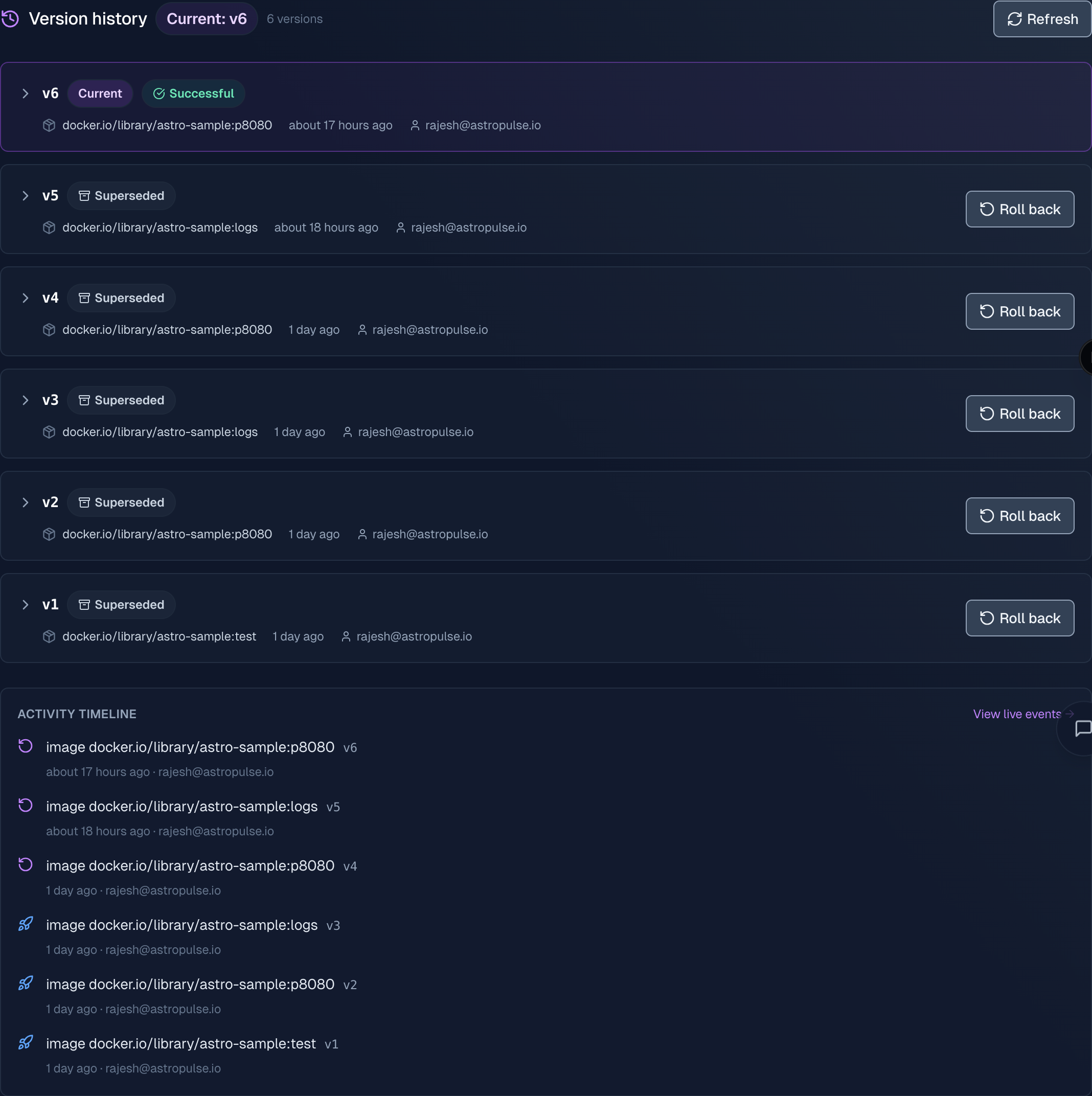
Expand any version to see exactly what shipped — source, image, who deployed it, when, and whether it is rollback-eligible:
Choose Roll back on an eligible version to see the plan — the exact before/after diff and any warnings — then confirm.
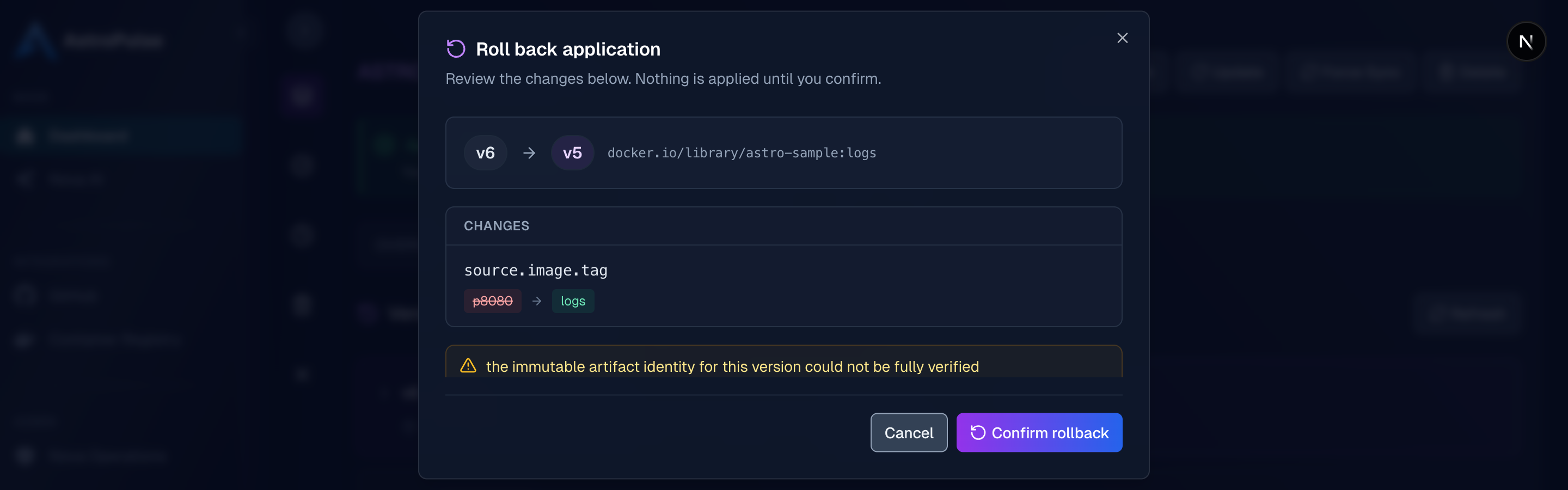
For a Git-tracked app that has been pinned, the History tab shows a Resume tracking action to return to following the branch.
CLI
astroctl app history myapp                    # full version timeline (add -o json or -o yaml)
astroctl app rollback myapp --dry-run         # preview the current → target diff, nothing applied
astroctl app rollback myapp                   # roll back to the previous version (asks to confirm)
astroctl app rollback myapp --to v4 --yes     # target a specific version, skip the prompt
astroctl app resume myapp                     # resume tracking the branch (Git-tracked apps)
Add --reason "..." to record an audit reason with the operation.
Nova
Ask in plain language, for example "show the deploy history for myapp" or "roll myapp back to the last good version." Because a rollback is destructive, Nova returns the plan first, the exact current version and target version and a sanitized before/after, and applies it only after you confirm the target. You choose the version to roll back to; it is never implicit.
Good to know
A rollback returns your application to a previous version, but it does not undo database migrations or other data changes. Plan data-affecting changes accordingly.
- Secrets must be references. A deploy is rejected if the spec contains a raw secret value, because versions are stored secret-free. Use secret references instead.
- Some fields are fixed. An application's profile and source type cannot change once set, so a rollback to a version that used a different one is not allowed.