Know What CVEs Your Cluster Is Actually Running

This is a cluster you already run, and these are the CVEs in its latest scan — the image, the package, the version you have, and the version that fixes it.
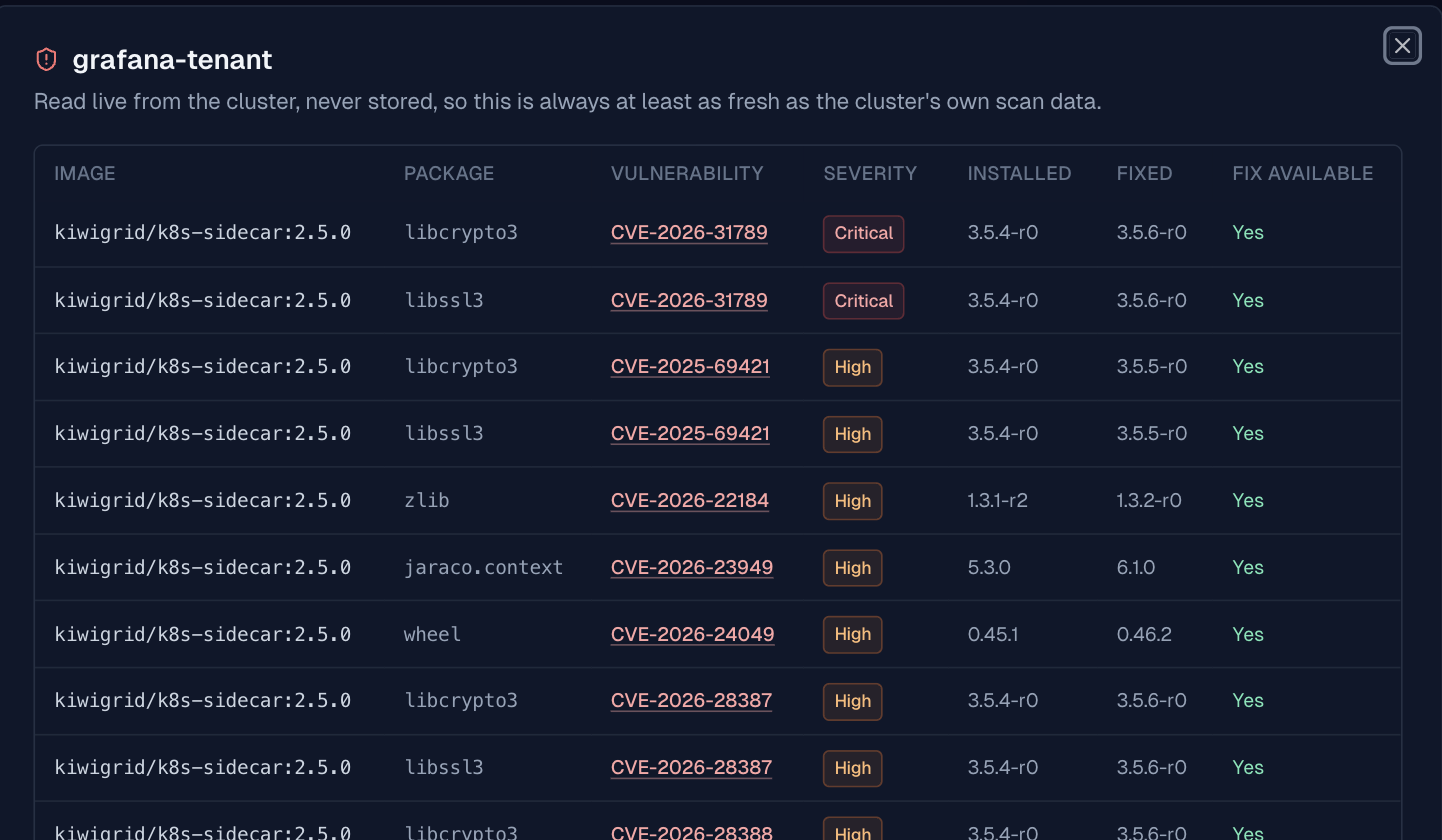
Vulnerability Scanning is a managed cluster add-on. Install it once at the cluster level and it keeps scanning the images behind your running workloads — nothing to configure per application.
Turn it on
In the console: your cluster's Add-ons tab → Install Add-on → Vulnerability Scanning.
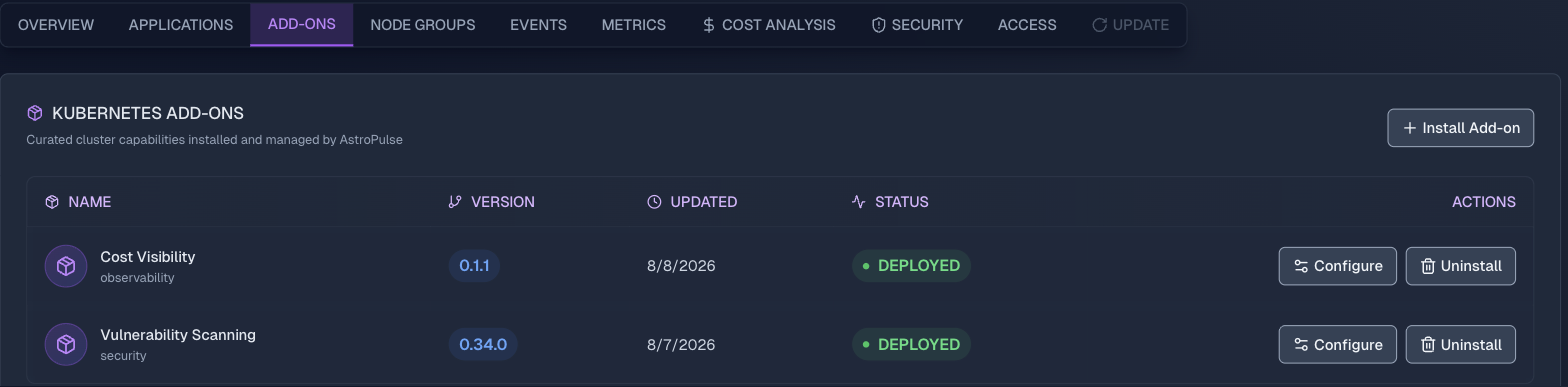
Add-ons are listed per cluster with the version installed, when they last changed, and whether they are currently deployed, so you can tell at a glance which clusters are actually being scanned.
Or apply it as a manifest:
apiVersion: platform.astropulse.io/v1
kind: K8sClusterAddon
metadata:
  name: vulnerability-scanning
spec:
  clusterName: production
  configuration:
    vulnerabilityScanning:
      severityThreshold: "CRITICAL,HIGH"
severityThreshold is the only decision most clusters need up front, and widening it later is an edit to the same manifest rather than a reinstall. Apply it once and the platform reconciles the rest:
$ astroctl infra k8s addons apply -f vulnerability-scanning.yaml
astroctl infra k8s addons status production vulnerability-scanning
Configuration is intent only — there is no credential field. Images your workloads already pull with imagePullSecrets work automatically; ECR, Artifact Registry, and ACR can instead use a cloud workload identity bound to the scanner. Registry credentials remain in your cluster and are not sent to AstroPulse. Scope, rescan cadence, identity setup, and the rest are in the add-on docs.
How the data moves
Scanning and reporting stay Kubernetes-native:
- Scan inside the cluster. AstroPulse installs and manages an in-cluster vulnerability scanner, which scans images used by workloads inside the configured namespace scope and produces Kubernetes-native vulnerability reports. By default, each workload is eligible for another scan after 24 hours;
scanFrequencychanges that interval. - Send only the posture summary. The connected Astro agent watches those reports, groups severity counts by workload and application, and sends AstroPulse one bounded latest snapshot. Individual CVE and package rows are not included in that stored snapshot.
- Fetch CVE detail only when requested. The console and CLI read package-level findings from the cluster's current reports through the connected-agent tunnel. AstroPulse returns that detail to the requester but does not persist it, and the request does not start a new scan. Nova uses the stored summary to answer current-posture questions.
The result is a fast cluster and application overview without copying the full vulnerability database or CVE inventory into AstroPulse. See Vulnerability Findings for the storage, freshness, size, and coverage contracts.
Where to look
The cluster's Security tab: severity totals, then every application and add-on broken out below, worst first.
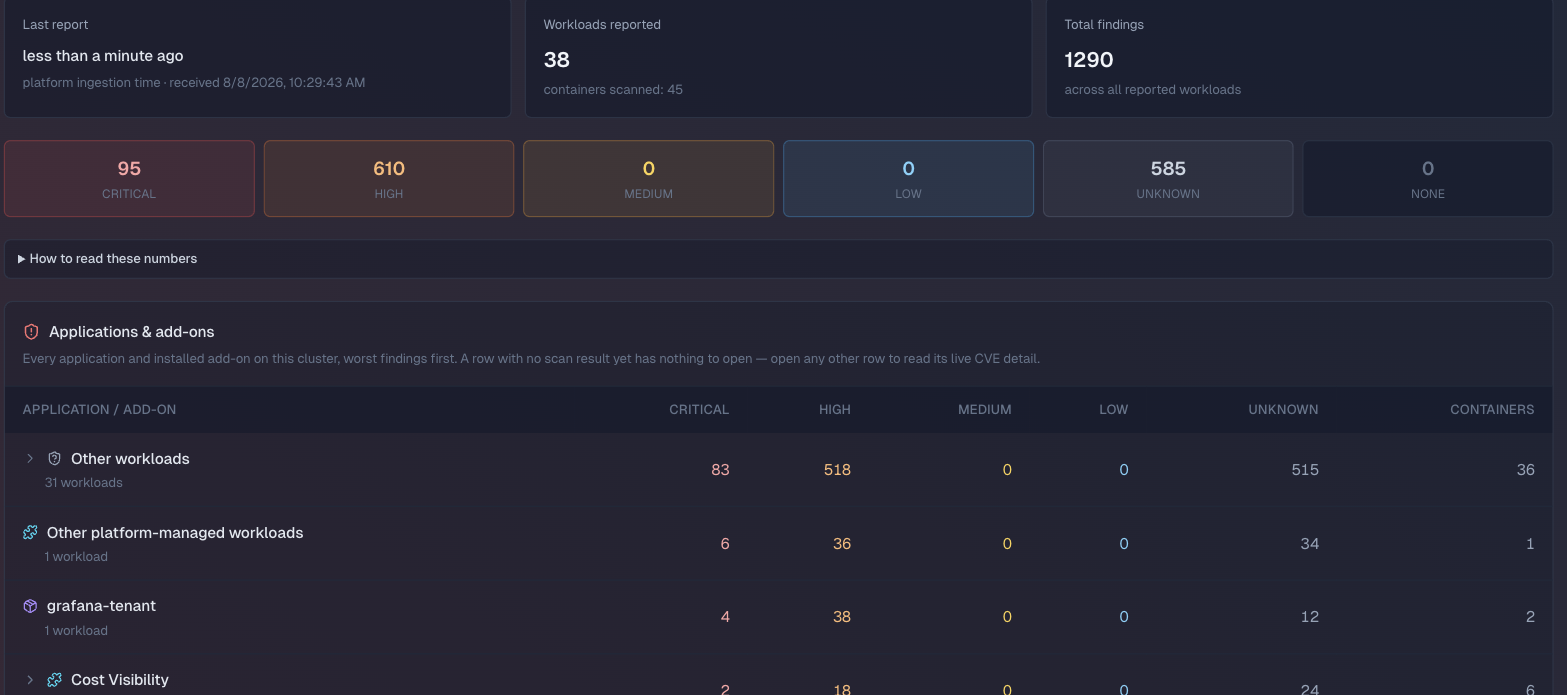
Each application has its own Security tab scoped to just that app, with live CVE detail grouped by image directly below its severity counts. In the cluster view, open a reported row to reach the same detail. Because that detail comes from the current in-cluster report, the view reflects the latest completed scan.
From a terminal, the same data:
$ astroctl infra k8s vulnerabilities my-cluster
astroctl app vulnerabilities checkout
astroctl infra k8s vulnerabilities my-cluster --application checkout
vulnerabilities also answers to vuln, vulns, and cve.
Ask Nova
You can ask the same current-posture questions in plain language and use the answer to decide which application to inspect first:
Ask Nova about a cluster or application's current severity posture and which reported application to inspect first. For package-level CVE rows, use the Security tab or astroctl ... --application. Open Nova in the browser, or ask from a connected editor.
Honest about what it doesn't know
An application whose scan hasn't produced a result yet shows that plainly — "no scan result yet" — instead of a row of zeros. The cluster-wide total says outright it can't be confirmed complete: there's no full workload inventory to check against, so an unscanned workload is simply absent, never a fake zero. Most tools hand you a clean number and let you assume it's the whole picture. This one won't.
Start with one cluster
Install Vulnerability Scanning on a cluster and open its Security tab.