Run your own AI models, skip the machinery

Every AI initiative starts with a choice: buy tokens from a frontier lab, or run models in your own cloud account.
For many teams, the lab API is the right answer. But renting is not an option when you need conditions a lab cannot sell you. You might need weights you own and can pin indefinitely, data that never leaves your infrastructure, predictable costs at scale, or independence from a model provider's roadmap.
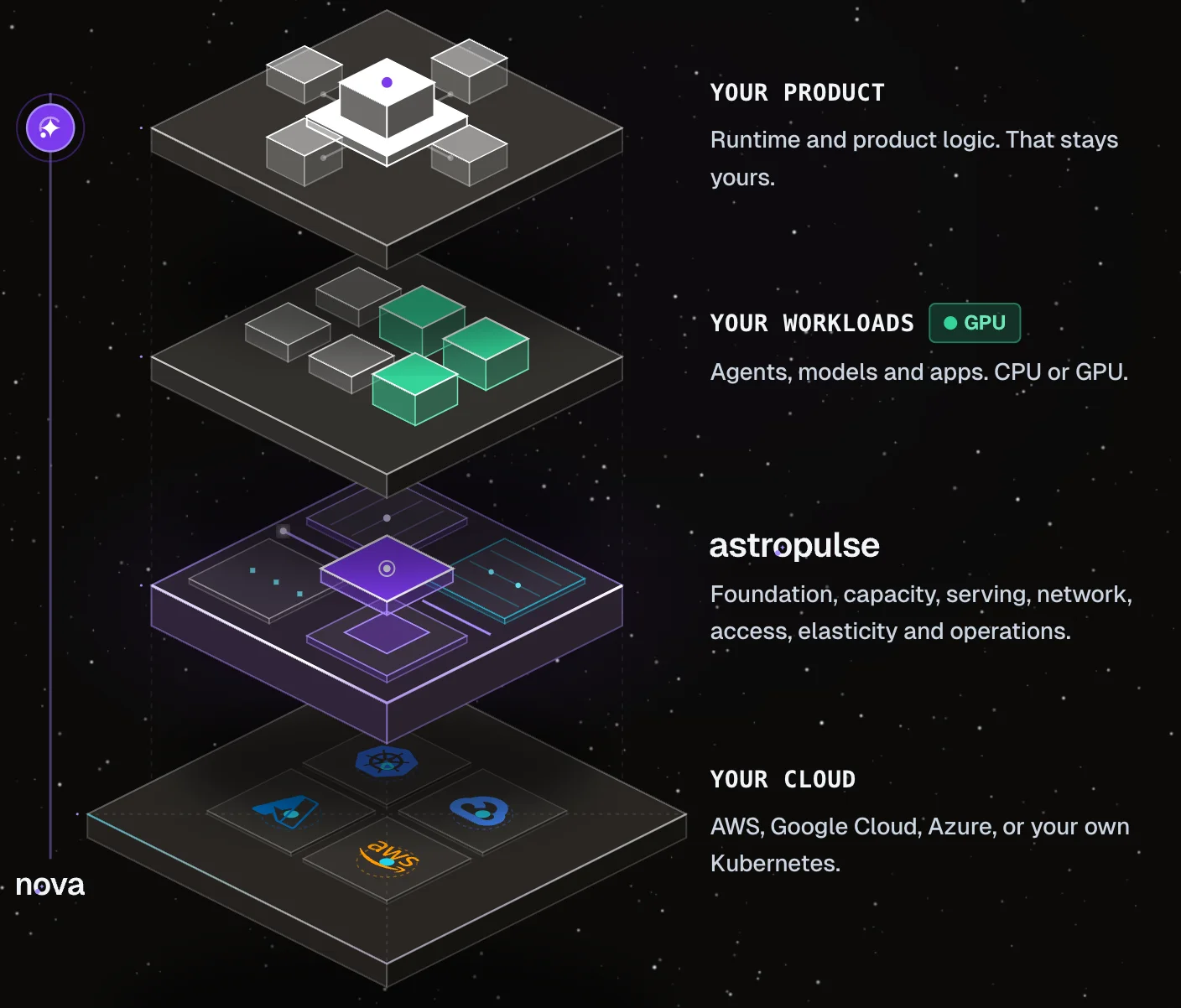
If you make the decision to run your own models, you immediately take on seven layers of infrastructure that the API used to hide. The lab bundled all seven into a price per token. Once you leave that bundle, you still need those layers. The question is who builds and operates them.
This is what AstroPulse solves. AstroPulse is the foundation layer for your AI infrastructure. It provides the automation and machinery required to operate your own internal developer platform. We do not provide the models, and we do not build your end product.
Whether you are an enterprise running models in your own cloud or a company building a specialized inference service on top of us, AstroPulse manages the underlying control plane. We handle the machinery, and you build what makes your product different: how you price and meter it, and how you route requests.
This post walks through the seven layers of AI infrastructure from bottom to top, detailing exactly what AstroPulse supplies and what stays yours to build.
I wanted the person with a model and a cloud account to get from that account to a model answering on their own domain without first building a platform team. That person is sometimes an enterprise team that wants its models next to its own data, and sometimes a single builder with an AWS, Google Cloud or Azure account. It is the same product for both.
Three choices shaped it. It runs in your account, so your weights and the requests your model answers stay in your cloud; we run the control plane, and you own what it controls. Every way in (the console, the astroctl CLI, the API or Nova) goes through the same platform, so a change looks the same whoever makes it, and changes to clusters and add-ons have a dry run that shows what will happen first. And people and agents work under the same guardrails: Nova proposes, a person approves, and it acts only within the permissions you give it.
- 88. Your product
AstroPulsedoes not provide this layer. It supplies the platform beneath it.
Youengine tuning and batching, routing, per-customer limits, metering, pricing, evaluations and the product experience.
- 77. Operations
AstroPulseshows model health, GPU use, spend, security findings and releases; alerts you route to Nova start an investigation.
Youthe alert rules, release decisions and service levels.
Watch metrics and costStart an investigationRelease and roll back
- 66. Elasticity
AstroPulseadds copies of the model as load grows, and GPU machines to run them.
Youthe fewest and most copies, and what to scale on.
- 55. Access
AstroPulsechecks every request's token or API key before it reaches the model.
Youyour sign-in provider, or API keys to start.
- 44. Network
AstroPulseverifies the domain and keeps its certificate and DNS record current.
Youthe domain.
- 33. Serving
AstroPulsechecks the model before it runs and serves it on the API most AI clients already speak.
Youthe model and how it runs.
- 22. Capacity
AstroPulsechecks quota and capacity before you wait, and adds GPU machines when a model needs one.
Youthe GPU type, the quota and the spend limit.
- 11. Foundation
AstroPulsecreates the cluster and, on AWS, gives each add-on only the cloud access it needs.
Youthe cloud account, the region and the access policies.
Running your own model means running seven layers
Everything a lab hides behind its price per token is in that diagram, and each layer links to the example that shows it working. Each one prevents a failure you would otherwise meet in production: a GPU quota you never had (it starts at zero in a new AWS account), a model on a bare machine address, an unauthenticated request reaching a GPU, paying for the peak all day or scaling too late, and nobody watching once it runs.
AstroPulse runs the machinery; you keep the knobs
AstroPulse does not make a model fast or decide how it scales. You do, with these knobs, and each has a sensible default:
- How many copies of the model run: at least one, up to the ceiling you set.
- What they scale on: Automatic by default, which picks requests waiting at the model for a generative model once Workload Autoscaling reads its metrics, and CPU for a model without a GPU. You can choose either and set its target.
- How much memory each copy gets. On CPU that also sets how much room the model has for the conversations it holds; on a GPU the runtime sizes that from the GPU's memory.
- How many GPUs the GPU pool may use, on AWS with Node Autoscaling: ten by default.
- How long an idle GPU machine stays in that pool: ten minutes by default. Keep a warm machine longer for faster restarts, and the dry run tells you what the wait costs.
- How large each node group may grow.
The reference for all of them is sizing and scaling a model.
The hard part is every day after
Getting a model online happens once. Operating it every day is the hard part, and the biggest pain of running your own. A normal week looks like this:
-
An add-on upgrade. Before Model Serving moves to a new version, a dry run names the models that will restart. Upgrading the add-on.
-
A vulnerability in the model's image. The Security tab names the fixed version; you rebuild and release. Vulnerability findings.
-
Cost at the end of the week. The Cost tab shows the model's spend for seven days. Watch metrics and cost.
-
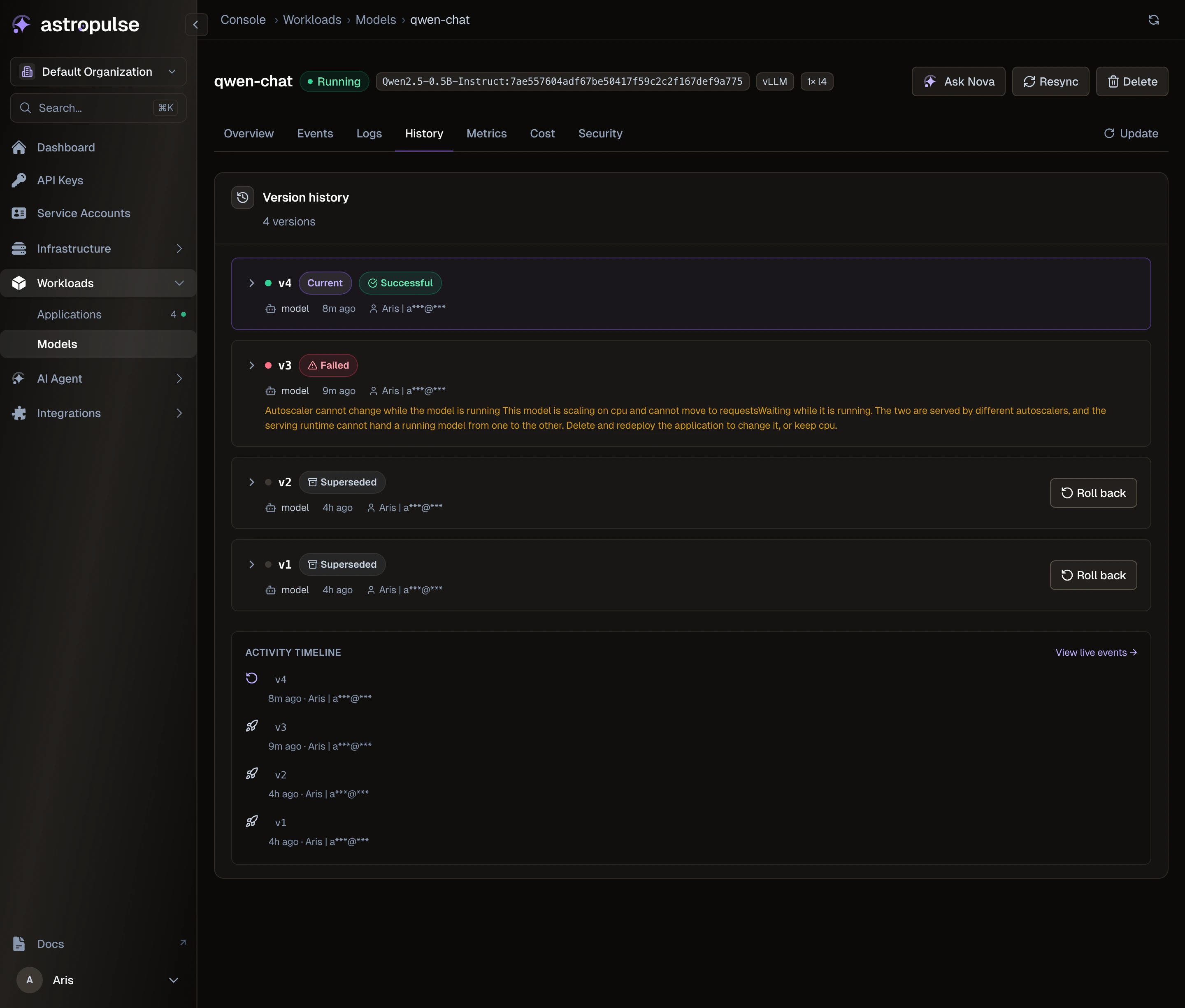
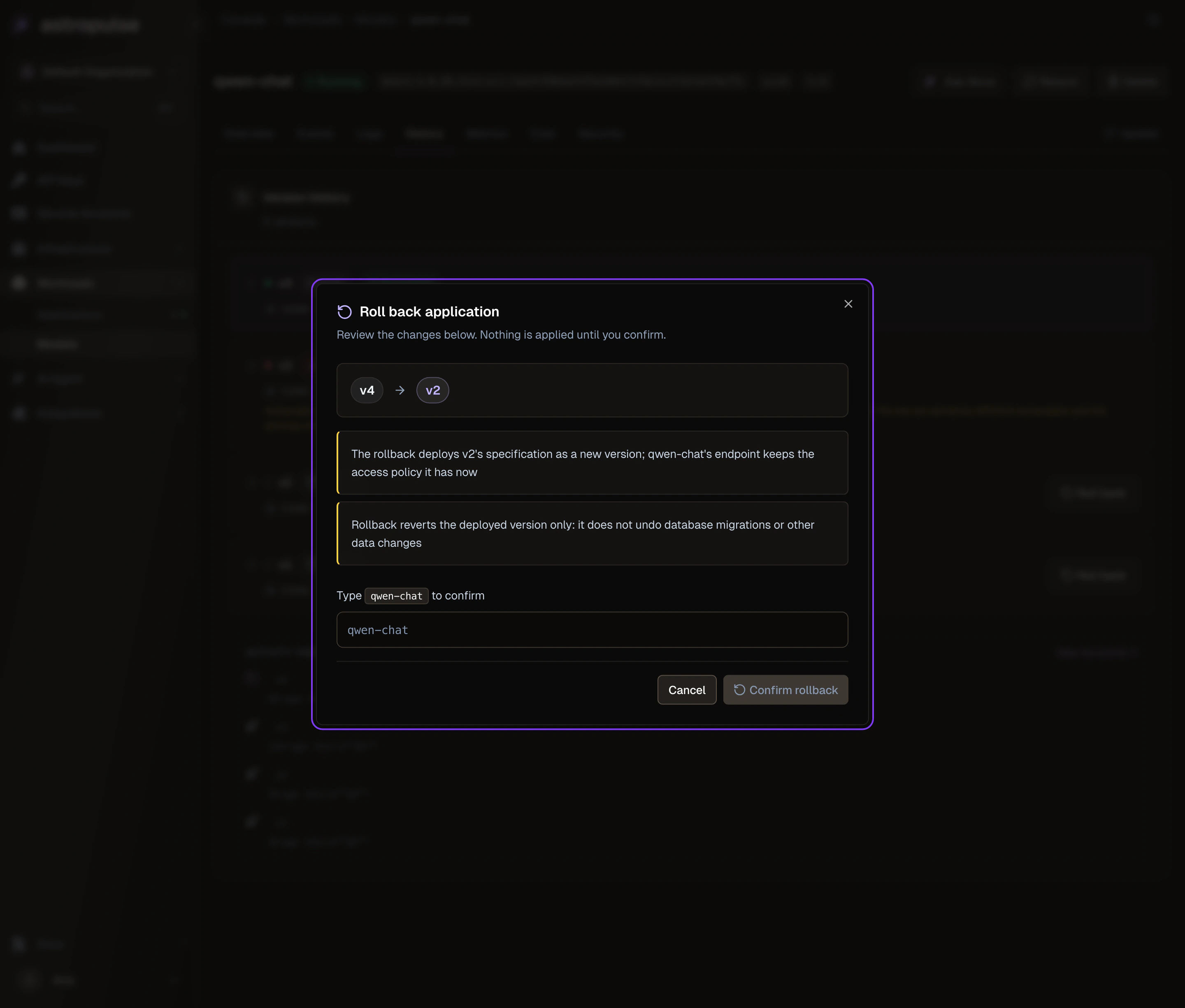
A release that goes wrong. Roll back from History: read the plan, type the name. Release and roll back.
-
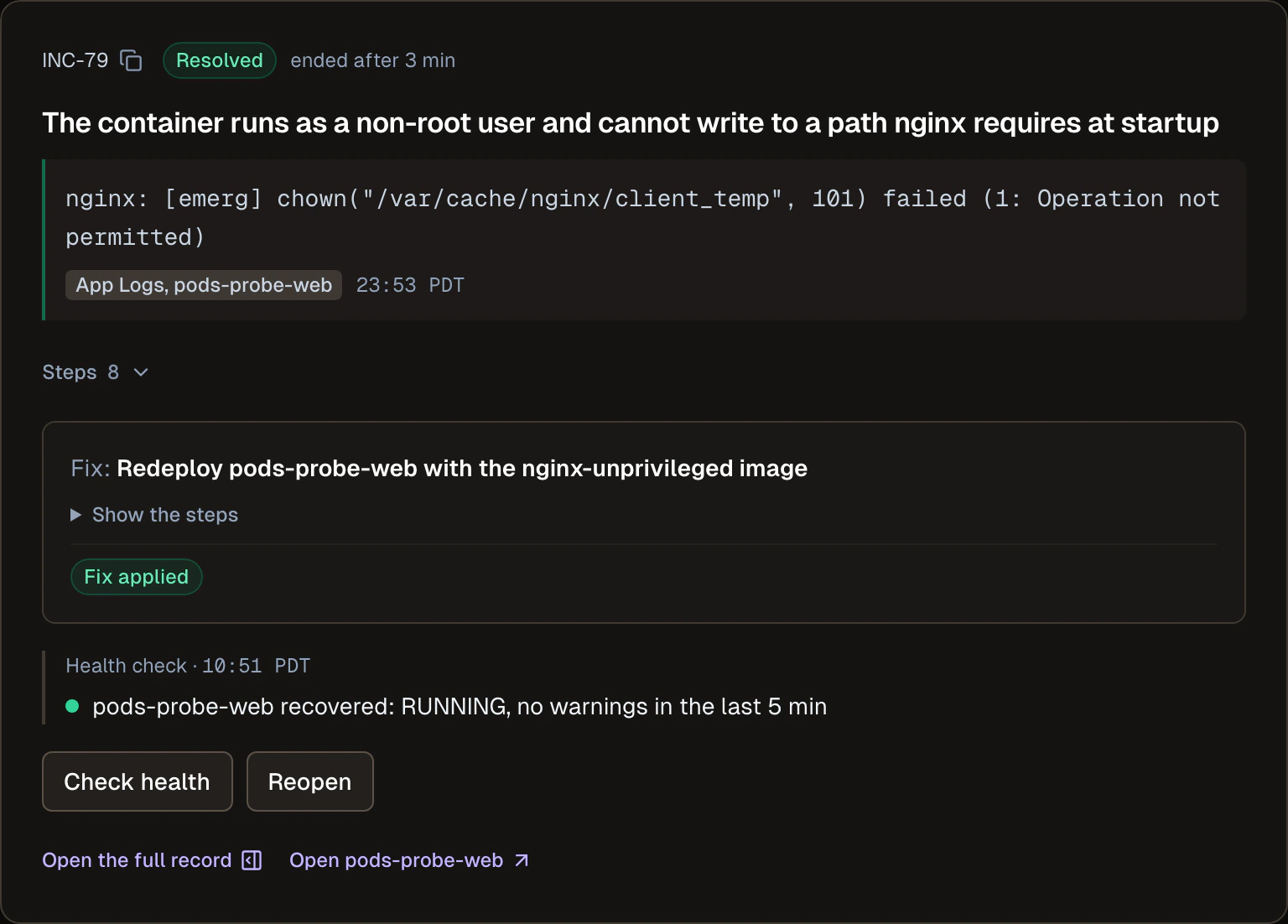
An incident. Nova investigates, you approve the fix, and the postmortem is drafted from the record. Write the postmortem from the record.
Nova runs it with you, on your approval
Nova, our AI platform engineer, builds this platform with you and runs it day to day. It sets up the layers from a plan you approve, and when your alert fires it investigates. It quotes its evidence with the source and time, and it proposes a fix only once the cause is confirmed. The fix waits for a person.
- Automated
- Tool
- Human
- 06:51:40Investigation startedAutomated
- 06:51:46First factsTool
- 06:51:52Checked past incidentsTool
- 06:52:27Built the timelineTool
- 06:52:55Access to a sensitive read allowedHuman
- 06:53:06Checked the current stateTool
- 06:53:06Tested possible causesTool
- 06:55:04Fix approvedHuman
- 07:08:43Applied and verifiedAutomated
Look at who did what on that timeline. Nova did most of the steps; a person made the two decisions: letting Nova read something sensitive, and approving the fix. We built scope, consent, approval, undo and audit before we let Nova change anything, and that order was deliberate.
To be clear about data: what Nova reads to investigate (status, events and settings without asking, application logs only after asking) goes to a hosted model provider to reason over, and application logs pass through the AstroPulse control plane. Your model's weights and the requests it answers stay in your cluster.
Where AstroPulse stops
We do not get you GPUs. Quota requests, capacity reservations and buying GPUs are between you and your cloud provider. AstroPulse tells you before you wait whether the quota and capacity are there, but it cannot create GPUs your account does not have.
We do not scale your product or pick your model. AstroPulse adds copies of a model and the machines they need, within your limits, and serves the model you bring. Which model you run, engine tuning and batching, routing across models, per-customer limits, metering, pricing and evaluations are yours. With everything your customers see, they are the eighth layer.
| Feature | AstroPulse | Your product adds |
|---|---|---|
| Pricing and metering | Not provided. Cost is reported per application, never per customer. | Plans, metering, billing, quotas |
| Request routing across models | Not provided. One endpoint per application. | One API that routes by model, version, tenant or cost |
| Custom runtimes and batching | Partly. Named runtimes are selectable; no engine arguments are passed through. | Engine tuning, batching, speculative decoding |
| Cold start and scale to zero | Partly. Cached weights, nodes launched for pending replicas; at least one replica always. | Scale-to-zero, warm pools, cold-start promises |
| Developer experience and SDKs | Partly. For the operator: console, CLI, API, Python SDK, Nova. For your customers: the OpenAI-compatible endpoint. | Customer SDKs, self-service keys, dashboards, docs, playground |
| Evaluation | Not provided. Latency, throughput, queue and GPU metrics only. | Evals, regression gates, quality monitoring |
| Domain data and knowledge | Not provided. | The data, the retrieval, the knowledge |
Below the line is machinery, and keeping it right is our job. Above it is your product, and that is where your time should go.
When to stay with a lab's API
Run your own only if you need to. Stay with the API when quality on your task decides, when you must ship this quarter with nobody to run infrastructure, or when a small or spiky load would leave a GPU idle. Test a lab's model on your task first.
Start here
Every layer is written up as an example you can follow, with each claim checked against our code. What the platform does not cover is in what model serving doesn't do.
To start, deploy an open model in your own cloud. From there, run production AI inference, build your own developer platform or put Nova on call.
Every team that runs its own models needs these seven layers. I would rather you spent your year on the eighth.