Your Startup Needs a Deployment Platform, Not a Platform Team

Many startups begin with one application and a hosted deployment service. That is usually the right decision. The team can ship without first building networking, deployment automation, or an operations layer.
The requirements change as the company adds services, environments, enterprise customers, private networking, and infrastructure ownership. The team still needs a short path to production, but the applications now need to run in infrastructure the company controls.
AstroPulse gives growing engineering teams a repeatable path from code to production in infrastructure they control, without requiring them to build the platform themselves.
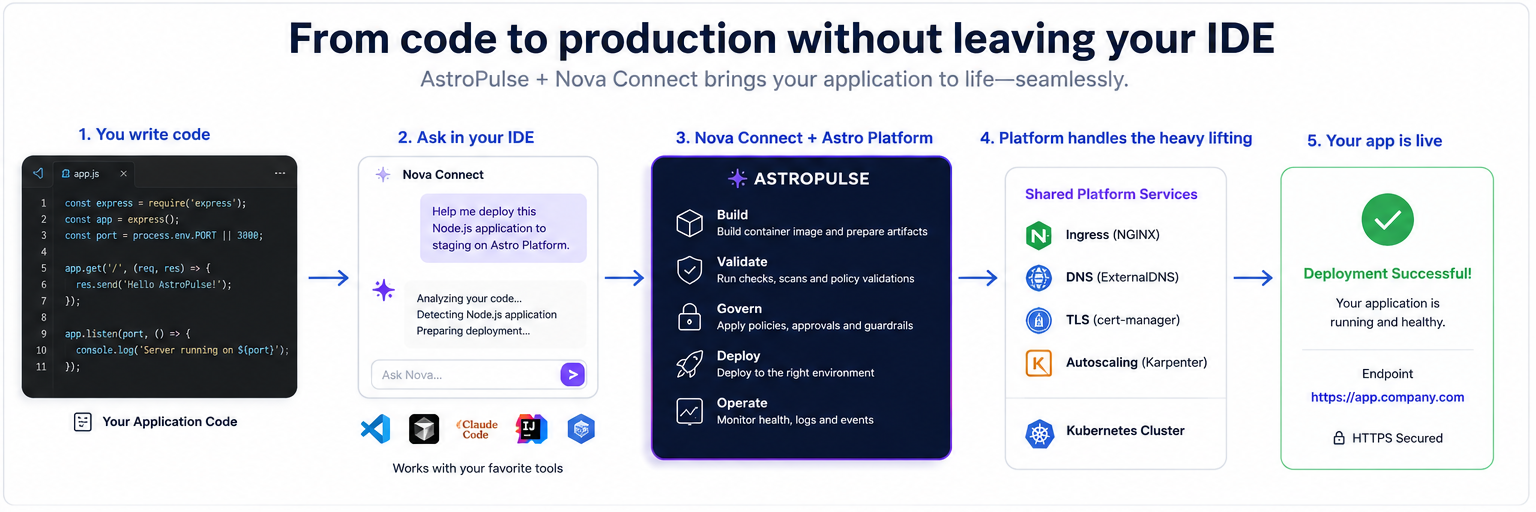
From code in the editor to a healthy application, with one platform reused across multiple services.
The hosted platform works until the requirements change
A hosted PaaS works well when the application fits the provider's runtime, network, and operating model. The trade-off becomes harder when the company needs its own cloud account, VPC, Kubernetes cluster, security controls, or cost model.
The platform work then appears in every repository. Teams must decide where an application runs, how it reaches the network, who can change production, how a failed release is recovered, and where operators find status, logs, and events.
These are shared platform concerns. Solving them separately for each application creates inconsistent deployment paths and makes routine work depend on a small number of infrastructure engineers.
The company needs a platform, not necessarily a platform team
Teams at this stage usually choose one of three paths:
| Path | What the company gains | What the company accepts |
|---|---|---|
| Hosted PaaS | A short deployment path with little infrastructure work | The provider's infrastructure model, workload limits, and operating boundaries |
| Build an internal platform | Complete control and customization | Continuing work on integrations, upgrades, support, and platform engineering |
| AstroPulse | A reusable application platform in company-controlled infrastructure | An accountable infrastructure owner still defines access, reliability, and exceptions |
AstroPulse does not remove operational responsibility. It provides the common path used to deploy and operate applications. An infrastructure owner remains responsible for the environment, access model, and production policy.
Configure the foundation once
Use Astro Platform to configure the shared foundation:
- Connect cloud accounts or register existing Kubernetes clusters.
- Define development, staging, and production application profiles.
- Authorize GitHub repositories.
- Configure domains and deployment destinations.
- Install shared cluster add-ons.
- Define roles, approval requirements, and production boundaries.
Application profiles connect a workload to an approved environment. Developers do not need the cloud account, region, cluster identifier, credentials, or namespace convention for each deployment.
Every request from the console, astroctl, or Nova uses the same control plane. Astro Platform checks identity, organization, target, policy, and required approvals before a sensitive operation runs. It resolves credentials at execution time and records the result.
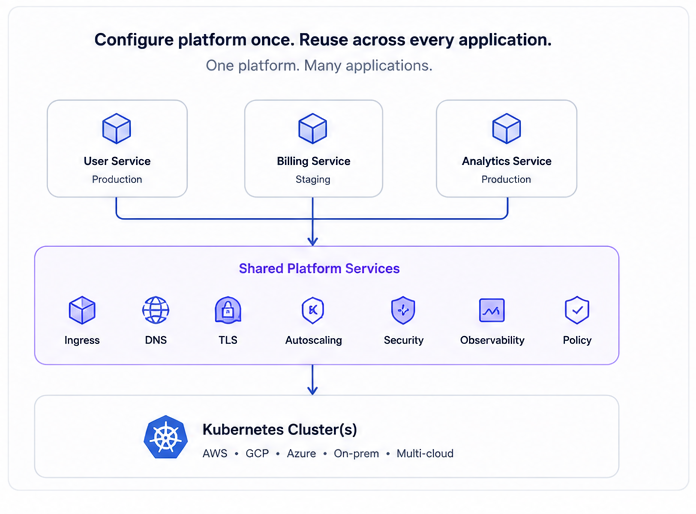
Configure shared platform services once and reuse them across applications.
Managed add-ons provide NGINX Ingress, ExternalDNS, cert-manager, and Karpenter at the cluster level. Applications can reuse ingress, DNS, TLS, and autoscaling instead of installing and maintaining those services independently. See Managed Add-ons and Custom Domains for a complete example.
Let developers choose how they deploy
Developers can use the interface that fits their work:
- Console: create and inspect applications in the web interface.
astroctl: deploy and operate applications from a terminal or automation workflow.- Nova Connect: ask Nova to deploy, inspect, or troubleshoot an application from a supported editor.
The interfaces are different, but they use one deployment control plane. A deployment created from the editor can be inspected in the console and managed with astroctl.
From code to production
The developer can begin in the editor with a direct request:
The right workflow depends on whether the application already has a deployable artifact. There are two deployment paths.
Deploy a prepared application
Nova Connect can deploy an existing container image or Helm chart. It resolves the approved cluster and application profile, validates the configuration, and presents the plan for confirmation. After approval, Astro Platform deploys the application and reports its rollout status.
Use this path when the repository already has a build process and produces a deployable artifact.
Use Prompt to Production
Prompt to Production covers the steps before a prepared deployment. It inspects the local workspace, detects the application and its dependencies, prepares missing packaging, builds the image, and produces a deployment plan. It can provision infrastructure when required and returns the application endpoint after deployment.
The workflow runs locally, so the source code remains on the developer's machine. The first request is read-only. The developer reviews and confirms the plan before Astro Platform makes changes.
Prompt to Production is implemented and available to organizations on request. AstroPulse currently enables it per organization while gathering feedback from real deployments before making it available by default.
The platform continues after deployment
A successful rollout is the start of the application lifecycle. Astro Platform and Nova provide the operational context needed after deployment:
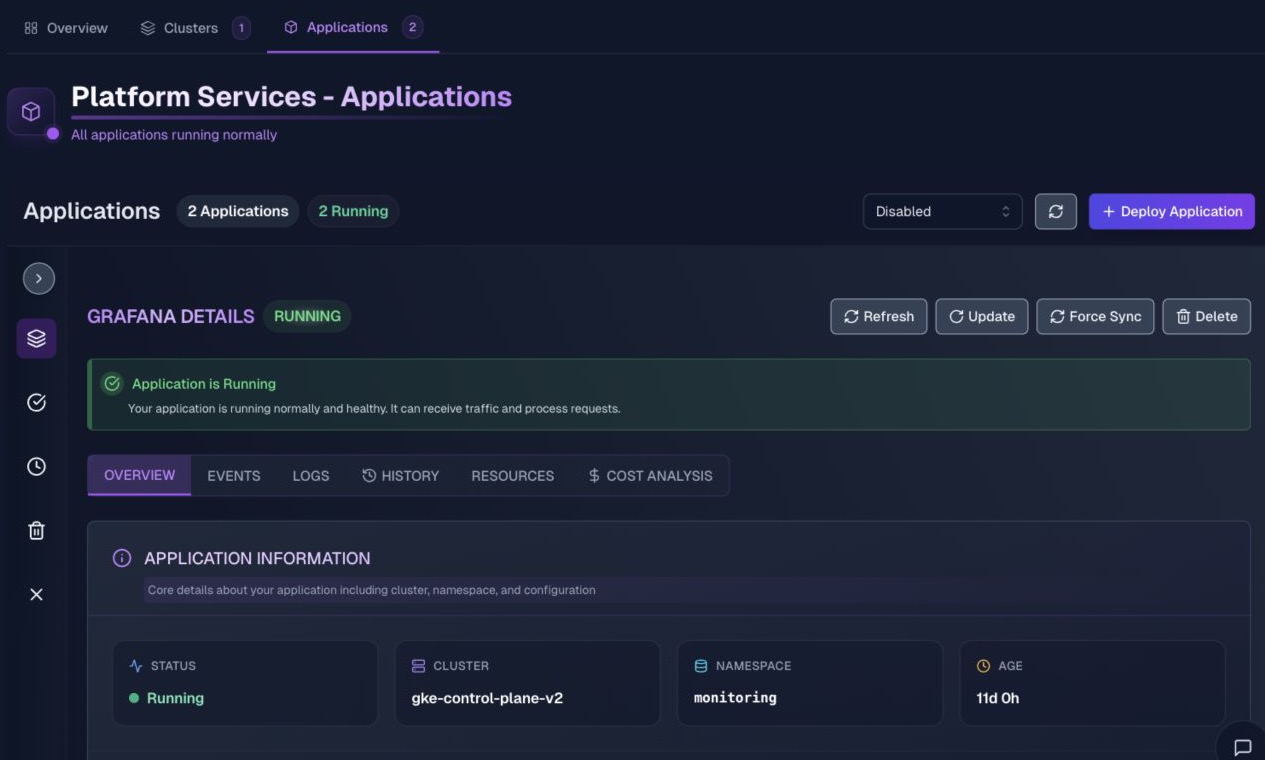
Application health, resources, events, logs, deployment history, and cost context in one operational view.
- health and rollout state
- application resources
- logs and Kubernetes events
- deployment history
- diagnosis and proposed remediation
- rollback to a selected version
- cluster pricing and cost estimates
Nova Connect can inspect this state from the editor:
For a rollback, the developer selects the target version and reviews a dry-run plan before execution. Changes follow the same approval and audit path as the original deployment.
AstroPulse provides infrastructure pricing and estimates during cluster planning. Live cost allocation for clusters and applications is available through the Cost Visibility add-on, which reports reserved and used resources side by side. See See What Your Cluster Reserves, Not Just What It Uses.
What AstroPulse supports today
| Area | Available capability |
|---|---|
| Clusters | Provision and manage EKS, GKE, AKS, and self-hosted Kubernetes, or register an existing conformant cluster. |
| Application sources | Deploy container images, public Helm charts, Helm charts stored in Git, and Kubernetes YAML stored in Git. |
| Application operations | Inspect status, resources, logs, events, and deployment history. Resynchronize, resume, and roll back applications. |
| Managed add-ons | Install, upgrade, inspect, and roll back NGINX Ingress, ExternalDNS, cert-manager, and Karpenter. |
| Nova | Inspect and operate infrastructure, diagnose applications, run security scans, and deploy through Nova Cloud, Nova Connect, or Nova Direct. |
| Prompt to Production | Prepare and deploy an application from a local workspace. Available to any organization on request. |
| Governance | Apply organization-scoped access, risk controls, approvals, and execution audit history. |
Technical note: test the application contract locally
Register a conformant local Kubernetes cluster such as kind, install the required add-ons, and deploy the same application definition used in later environments.
A local cluster does not reproduce cloud load balancers, IAM, managed databases, or regional failure modes. It does provide the same application contract, validation, deployment request, and status reporting. The managed add-ons guide includes a local example.
Start with one service
Evaluate the platform with one non-production service:
- Register an existing Kubernetes cluster or create a local one.
- Install the shared services required by the application.
- Deploy through an application profile.
- Verify the endpoint, rollout status, logs, and events.
- Change the application and confirm that the same path is repeatable.
Choose a starting point:
- Full setup guide: get started with Astro Platform.
- No cloud account required: follow Managed Add-ons and Custom Domains.
- Existing Kubernetes: bring your cluster to Astro Platform.
- Editor workflow: set up Nova Connect.
- Prompt to Production: request access or contact AstroPulse.
The evaluation succeeds when a developer can deploy, inspect, change, and recover the service through one repeatable path. Expand to more applications after that path is established.
A growing company should not have to choose between the simplicity of a hosted platform and control of its own infrastructure. AstroPulse is building the path between them: a reusable platform foundation for infrastructure owners and a direct path to production for developers.
Configure the platform once. Reuse it across every application.
Bring an existing cluster, create a local environment, or request Prompt to Production access.